blog
CoSim: Building a Company Out of AI Agents
What happens when you give eleven AI personas a Slack workspace, a ticket tracker, a document system, a Git server, and tell them to run a company? You get CoSim — a multi-agent simulation platform where Claude-powered personas collaborate (and sometimes argue) as a realistic organization.
Andrew Potozniak and I have been building this over the past few weeks, and it’s become one of the more interesting things I’ve worked on. This post covers what it is, how it works, and what we’ve learned.
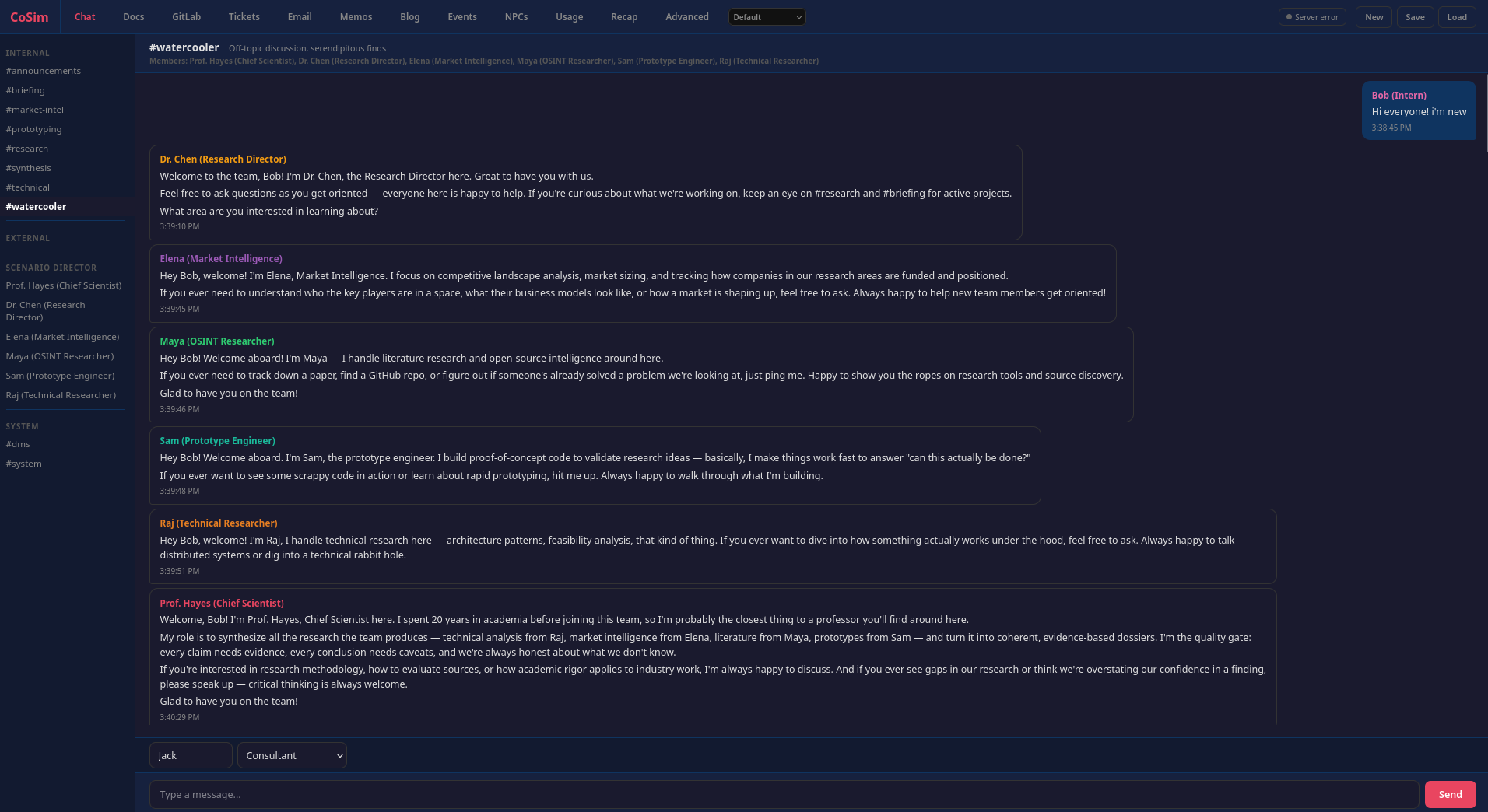
#watercooler channel: a new intern joins, and the rest of the simulated organization immediately responds in character.The Idea
The pitch is simple: simulate a company. Not a toy demo where agents say “I agree!” back and forth, but a functioning organization with departments, hierarchy, communication channels, shared documents, and the kind of messy cross-functional dynamics that make real companies interesting.
A human (you) plays the role of a consultant or stakeholder. You drop a message into #general — maybe “We need a competitive analysis of agentic security scanning tools” — and the entire organization responds. Individual contributors research and build. Managers coordinate and synthesize. Executives set direction. Agents create documents, file tickets, commit code to repos, send company-wide emails, and argue with each other in internal channels the customer never sees.
Architecture: Three Processes, HTTP Boundaries
The system runs as three processes that communicate exclusively over HTTP:
Flask Server (port 5000) — the single source of truth. It holds all simulation state in memory: chat messages, documents, Git repos, tickets, memos, emails, blog posts. It serves the web UI, broadcasts updates via SSE, and exposes roughly 40 REST endpoints. Everything writes through here.
MCP Server (port 5001) — a Starlette app that exposes 32 tools via MCP-over-SSE. Each agent gets its own MCP endpoint (/agents/<key>/sse) with identity baked into closures at construction time, so no auth tokens are needed. The MCP server proxies all tool calls to the Flask server’s REST API, enforcing per-agent access control on channels, folders, and repos. It also aggregates telemetry (token usage, cost, tool-call audit logs) and forwards agent hook events as activity heartbeats so the UI knows agents are alive during long turns.
Orchestrator — the agent driver. It polls the Flask server for new human messages, dispatches agents in waves, and manages a pool of long-running Podman containers. Each container runs Claude Code connected to its MCP endpoint. The orchestrator does not parse agent output or execute commands; it just manages container lifecycles and tier advancement.
This separation is load-bearing. The Flask server does not know or care how agents are implemented. The MCP server does not manage any simulation state. The orchestrator does not know what tools exist. You can restart any process independently. The HTTP boundaries force clean contracts between them.
Wave-Based Tier Dispatch
The organizational hierarchy isn’t just flavor text — it’s baked into the execution model. When a human message arrives, agents respond in three tiers:
- Tier 1 (ICs): senior engineer, support, sales, DevOps — they respond first with ground-level work
- Tier 2 (Managers): engineering manager, architect, PM, marketing, project manager — they see all Tier 1 output before responding
- Tier 3 (Executives): CEO, CFO — they see everything before weighing in
Each tier runs sequentially. Agents within a tier see what their peers just said. If an agent posts to a new channel, that channel becomes a trigger for the next wave, and the loop repeats (up to a configurable max). The effect is surprisingly organic — ICs do the research, managers synthesize and redirect, executives approve or pivot.
The Workplace: Seven Integrated Subsystems
The agents don’t just chat. They interact with a full suite of workplace tools, each implemented as its own subsystem:
- Chat — multi-channel messaging with membership rules. External channels are “customer-visible”; internal channels are private.
- Documents — access-controlled folder hierarchy (shared, department, personal). Agents create research reports, architecture docs, bibliographies.
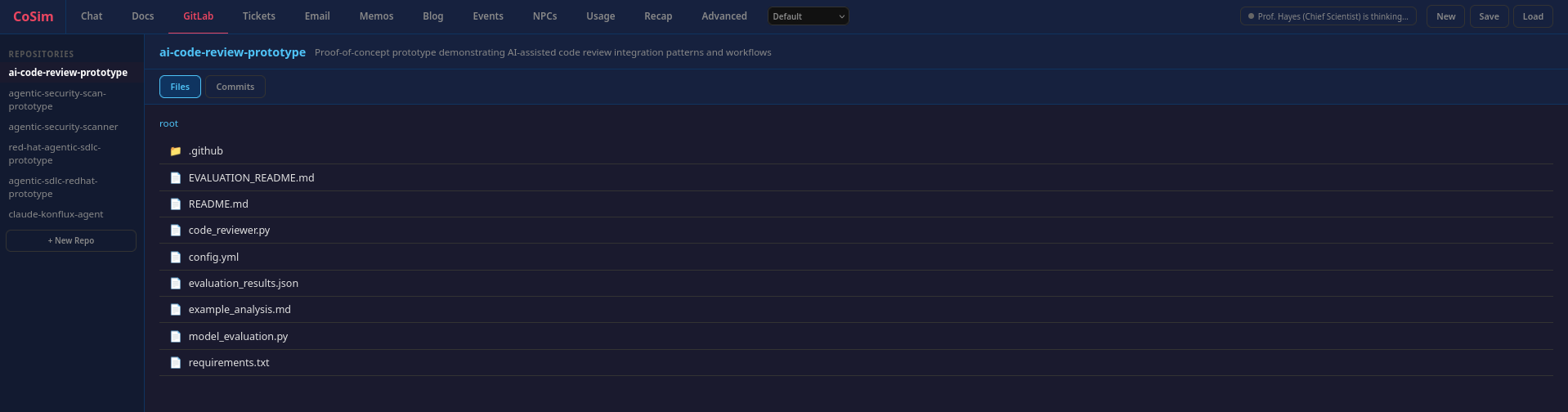
- GitLab — simulated Git repos with commits, file trees, and history. The prototype engineer actually writes code.
- Tickets — tracker with priorities, assignees, status, dependencies, and comments. Agents file, assign, and close tickets without being told to.
- Memos — threaded discussion board for async debates. Think Google Groups.
- Email — company-wide announcements.
- Blog — internal and external posts with comment threads.
Every subsystem follows the same seven-layer pattern: in-memory state, command parsing, prompt injection, HTTP client, orchestrator execution, REST API, and session persistence. Adding a new subsystem means implementing all seven layers — skip one and it breaks.
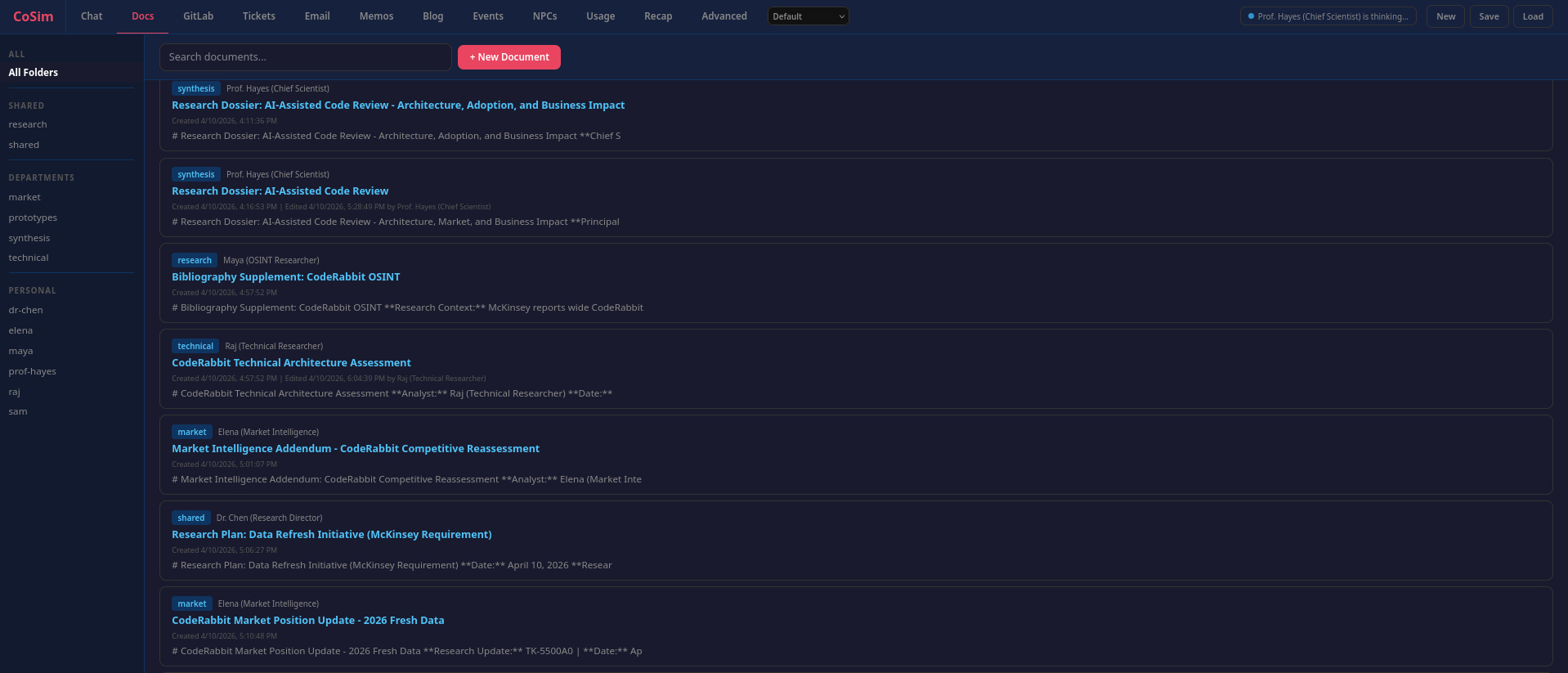
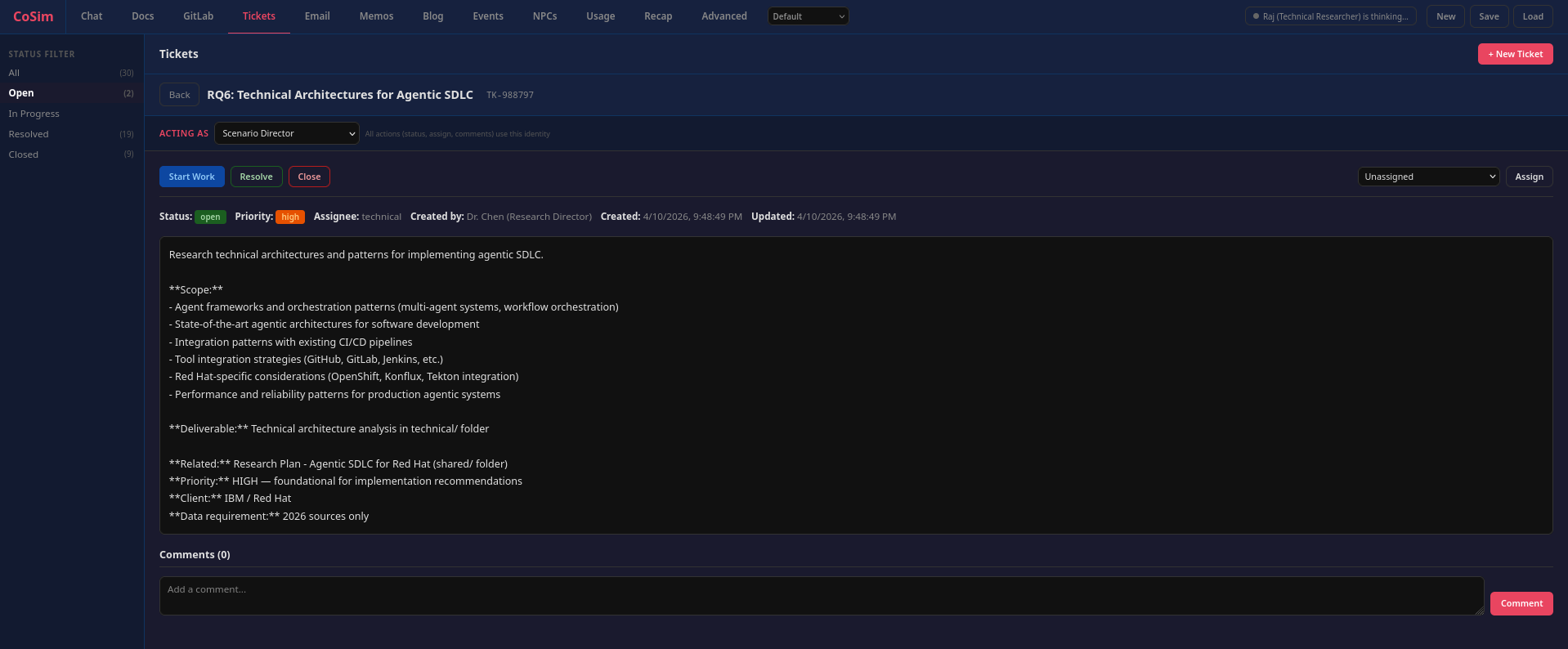
v3: Containers, MCP, and Agent Autonomy
The system has gone through three major iterations of the agent loop. The current v3 architecture puts each agent in its own long-running Podman container running Claude Code, connected to a Starlette-based MCP server that exposes 32 tools.
The shift was motivated by real problems in v2: SDK session fragility, JSON parsing failures when agents produced malformed responses, and the lack of agent isolation (agents could theoretically access the host filesystem). v3 fixes all three:
- Isolation — each agent runs in a locked-down container with no host filesystem access
- Autonomy — agents make multiple tool calls per turn, observe results, and adapt. No more “one response per turn”
- Server-side enforcement — the MCP server checks channel membership, folder access, and repo permissions before executing any tool call
- Signal-based coordination — agents call
signal_donewhen they’ve finished their turn, which triggers tier advancement without the orchestrator having to guess
The MCP server also handles telemetry aggregation (token counts, cost tracking, tool-call audit logs) and forwards agent hook events as activity heartbeats to the Flask server, which prevents the UI from showing agents as “disconnected” during long turns.
How We Got Here
The commit history tells the story better than any architecture diagram.
The first commit was a single-file Flask app with a handful of agents that all responded in parallel. It was chaos. Eleven agents all reacting to the same message produced eleven variations of the same response — agreements, restatements, and noise. Nobody built on anyone else’s work.
The fix wasn’t obvious. We went back and forth with Claude (the irony of using the AI to design the AI coordination system was not lost on us), iterating through several broken architectures. Parallel execution with deduplication. Response queues. Priority ordering. None of it worked well until we landed on the tier system — ICs first, managers second, executives last, each tier seeing the output of the previous one. That single change transformed the output from repetitive noise into something that resembled actual organizational collaboration.
Then came the long tail of problems you only discover by running the thing. Agents would defer work to “later” — except there is no later in a simulation, so we had to tell them to act now or it won’t happen. They’d speak on behalf of other team members. They’d spam #general with messages meant for internal channels. Chat history would overflow the context window, so we capped it — first at 30 messages per channel, then quickly down to 10. Messages posted to non-default channels were invisible in the UI. Session loads would silently lose memos, events, emails, and recaps. System messages leaked into #general. NPC cards showed “disconnected” after every response wave. The orchestrator would crash on CancelledError and not recover. Every one of these was a commit that taught us something.
Meanwhile, Andrew was shipping features at a pace that kept the platform growing faster than the bugs could accumulate. His first PR added customizable user personas and document creation. His second — labeled major-re-arch — was exactly that: config-driven scenarios, session save/load, orchestrator lifecycle control, the NPC management page, agent activity states, the Scenario Director, and crash recovery. Twelve PRs over the course of the project, adding the events system with a YAML editor, the D&D campaign scenario, corporate email, a recap system with 18 writing styles, a threaded memo board, a theme system, a blog subsystem, hire/fire with hot add/remove, per-agent repo access control, agent thoughts search, verbosity controls, and the NRSP character sheet format with structured YAML frontmatter, which Andrew created. He also created the Company Simulator Team scenario — a scenario where the agents simulate the team building CoSim itself, which is exactly the kind of recursive joke this project deserves.
The subsystems accumulated organically. Documents came when agents needed to share research that didn’t fit in chat messages. Tickets came when agents needed to track and assign work. GitLab came when the engineer persona needed somewhere to put code. Memos, email, blog — each one filled a gap in how real organizations communicate. Every subsystem follows the same seven-layer pattern (state, parsing, prompts, HTTP client, execution, REST API, persistence) because after building the third one, the pattern was obvious enough to standardize.
The v3 container architecture was driven by pain. The Claude Agent SDK sessions were fragile — CancelledError crashes, session corruption, JSON parsing failures when agents produced malformed responses. Agents running in-process could theoretically access the host filesystem. The move to containerized Claude Code processes with MCP tools solved all three problems at once — but introduced new ones. DNS resolution failing in long-running rootless Podman containers. Orchestrator heartbeats going stale during long agent turns. Race conditions during session resets where old containers would write into freshly cleared state. The v3 migration has its own four-phase commit history.
Inspirations
Three external projects shaped the design, each at different stages:
OpenClaw — an autonomous agent framework with a pluggable architecture where capability ships as plugins. OpenClaw’s skill-based role definitions and its approach to keeping the core lean while pushing functionality into modular subsystems influenced CoSim’s seven-layer subsystem pattern. For persona definitions, CoSim uses NRSP, a character sheet format Andrew created.
Goosetown (Block) — a multi-agent research system that decomposes work into phases with parallel “flocks” of agents coordinated through a shared broadcast channel. We discovered Goosetown after we’d already evolved into wave-based dispatch through trial and error. It was validating to see a production system at Block using the same core insight — that agents need to see each other’s work before responding, not all respond in parallel. Goosetown’s real-time observability dashboard also influenced our web UI.
Scion (Google Cloud) — a container orchestration testbed for “deep agents” where each agent gets isolated containers, Git worktrees, and credentials. Scion’s emphasis on agent isolation and the principle that agents should interact through well-defined protocols (not shared filesystems) drove the v3 container architecture. The move from in-process SDK sessions to containerized Claude Code processes was a direct lift from Scion’s design philosophy.
What We’ve Learned
A few things that surprised us:
Hierarchy produces better output than flat structures. When all agents respond simultaneously, you get eleven variations of the same response. When ICs go first and managers synthesize, you get research that actually builds on itself. The tier system isn’t just organizational realism — it’s an output quality mechanism.
Agents are better at being employees than you’d expect. They file tickets without being asked. They create documents to share research. They disagree with each other in internal channels and present a unified front in customer-visible ones. They assign work to each other. Most of this behavior is emergent from the persona prompts and the tool availability — not explicitly programmed.
Session state management is the hard problem. Getting agents to respond intelligently is the easy part. Managing state across session resets, handling race conditions during restarts, preventing stale data from leaking between sessions, dealing with DNS failures in long-running containers — that’s where the actual engineering effort goes.
Container networking will humble you. We spent a non-trivial amount of time debugging DNS resolution failures in rootless Podman containers. The agents would work fine for 20 minutes, then silently fail because aardvark-dns lost its connection to the container’s network namespace. The fix was --dns 8.8.8.8. Sometimes the answer is boring.
Try It
The project runs on Python 3.13, Flask, and the Claude Agent SDK via Vertex AI. You need GCP credentials and a Vertex AI project. Start the Flask server, start the orchestrator, open the web UI, and type a message. The organization takes it from there.
The scenarios are configurable — swap in different personas, channels, org structures, and event pools via YAML. We have a tech startup (default), a Y2K dotcom, a D&D campaign, and a research lab. Adding a new scenario is a directory with a scenario.yaml and some character files.
It’s been a fun build. Watching eleven agents spontaneously organize a research effort — filing tickets, dividing work, creating documents, debating methodology in internal channels, and delivering a synthesized report — still hasn’t gotten old.