legacy-wiki
Boot-from-san
Recovered from the older tannerjc.net wiki snapshot dated January 23, 2016.
Notes
-
EMC® Host Connectivity Guide for Linux P/N 300-003-865 REV A18
-
EMC supports the Emulex in-kernel default drivers in the distribution in most later operating systems.
-
EMC supports the QLogic in-kernel default drivers in the distribution in most later operating systems.
-
The Symmetrix or CLARiiON device that is to contain the Master Boot Record (MBR) for the host must have a lower logical unit number (LUN) than any other device visible to the host.
-
EMC Virtual ProvisioningTM devices utilized for boot volumes; /boot, / (root), /swap, and /dump are supported on Symmetrix and must be fully allocated and not oversubscribed. This means the thin data pool(s) that are involved in supplying Symmetrix Virtual Provisioning (thin) devices must contain sufficient user capacity to fully allocate all the thin devices bound to them.
-
All arrays, except the array where the boot device resides, should be un-zoned from the host server. On the array where the boot device resides, there should only be the boot device that is attached to the host server.
-
EMC recommends that the boot LUN be assigned Host LUN ID 0. If the boot LUN has taken a Host ID other than 0, there is a possibility for HBA BIOS installation failure, hence no visibility to the boot LUN.
-
The boot LUN’s Host ID on a CLARiiON can be forced to 0 by removing all the other LUNs from the storage group and adding only the boot LUN back to it. For Symmetrix, the Symmetrix LUN base/offset skip adjustment (symmask set lunoffset) capability can be used to assign LUN 0 to the desired boot LUN if necessary.
-
SLES accepts only single path to the boot device during installation with DM-MPIO. In addition, boot-from-SAN setups using PowerPath must have only one path connected during installation.
Configuring LUNs
- EMC luns have to be exported from navisphere.
Configuring Zoning
- Enumerating wwn’s for the HBA ports
[root@localhost ~]# find /sys/class/fc_host -name port_name | sort
/sys/class/fc_host/host3/port_name
/sys/class/fc_host/host4/port_name
/sys/class/fc_host/host5/port_name
/sys/class/fc_host/host6/port_name

[root@localhost ~]# find /sys/class/fc_host -name port_name | sort | xargs -I {} cat '{}'
0x21000024ff212bba
0x21000024ff212bbb
0x21000024ff212c60
0x21000024ff212c61
Configuring HBAs
Qlogic
- Enter the bios by pressing ctrl-Q during boot
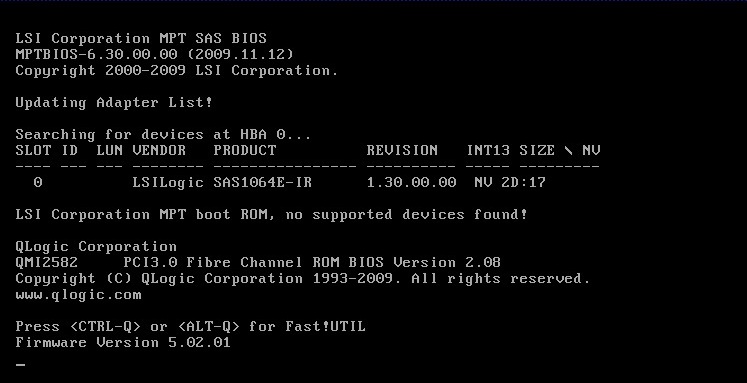
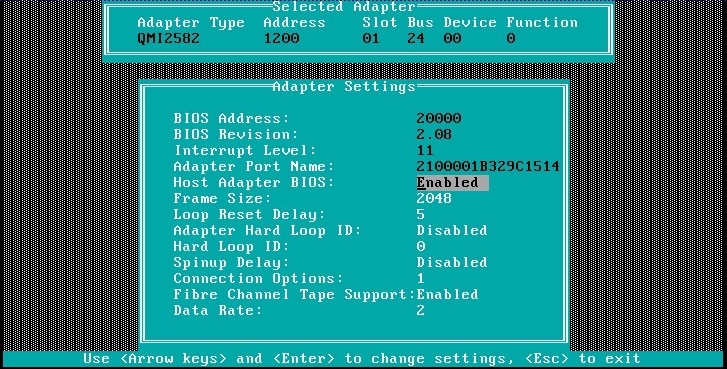
- Select the first HBA in the Select Host Adapter window and navigate to Configuration Settings – Adapter settings. Enable the Host Adapter BIOS.
- Press ESC key to return to the Configuration Settings menu. Select the Selectable Boot Settings and enable the Selectable Boot.
- Select the Primary Boot Port Name, Lun and press Enter.
- Select the correct LUN number and press Enter (ask your storage administrator in case of doubt).
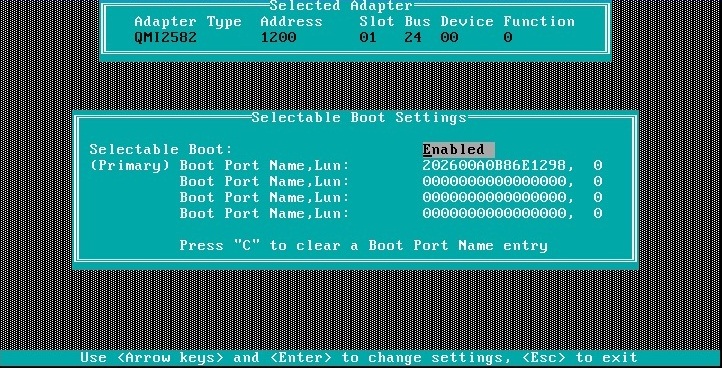
- If a LUN can not be selected, try deactivating the other LUNs in the zone from navisphere.
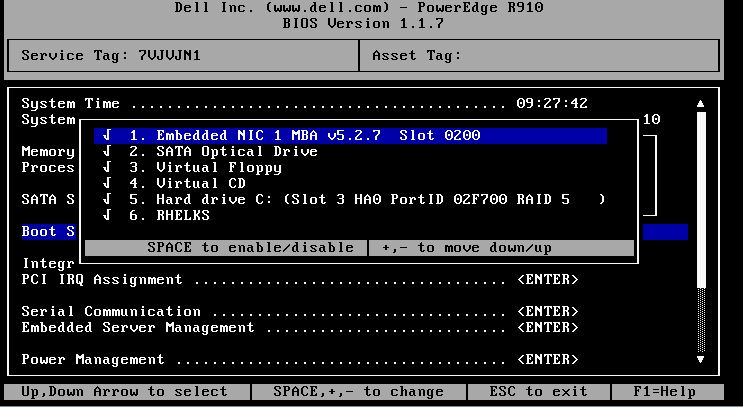
- A DELL bios must then be told to boot from the HBA. Hard Drive C Slot3 is the HBA.
Configuring Kickstart
- A valid bootloader line + /boot directive
- https://access.redhat.com/kb/docs/DOC-18568
bootloader --location=mbr --driveorder=mapper/mpath0 --append=mpath rhgb quiet
clearpart --all
part /boot --fstype ext3 --size=1024 --ondisk=mapper/mpath0
- How to specify which lun
- https://bugzilla.redhat.com/show_bug.cgi?id=629834
- device can also be an underlying path, such as sda
multipath --name=mpath0 --device=3600a0b8000132751000001874a8e433a --rule=
bootloader --location=mbr --driveorder=mapper/mpath0,sda --append=console=ttyS0,9600
clearpart --all  --drives=mapper/mpath0
part /boot --fstype ext3 --size=100 --ondisk=mapper/mpath0
- Working example
- kernel options: mpath nostorage
- post kernel options: mpath
- advanced options custom options: device scsi qla2xxx
bootloader --location=mbr --driveorder=mapper/mpath0 --append=rhgb quiet
clearpart --all
part /boot --fstype ext3 --size=1024 --ondisk=mapper/mpath0
part pv.100000 --size=117000 --ondisk=mapper/mpath0
volgroup intva --pesize=32768 pv.100000
logvol / --fstype ext3 --name=lv_root --vgname=intva --size=51200
logvol /home --fstype ext3 --name=lv_home --vgname=intva --size=10240
logvol swap --fstype swap --name=lv_swap --vgname=intva --size=992
logvol /usr --fstype ext3 --name=lv_usr --vgname=intva --size=5120
logvol /tmp --fstype ext3 --name=lv_tmp --vgname=intva --size=25600
Troubleshooting
- Start by looking at the zoning definitions to make sure all wwin’s for the targets and initiators are present.
- If the HBA bios can not see any LUNs, but the zoning looks correct, the LUNs are probably not exported.
- A grub disk error usually indicates that the bios has booted from something other than the LUN with an mbr.
- A grub prompt could also indicate that the bios booted from something other than the LUN with an mbr.