legacy-wiki
Lab oracle rac
Recovered from the older tannerjc.net wiki snapshot dated January 23, 2016.
Infrastructure Overview
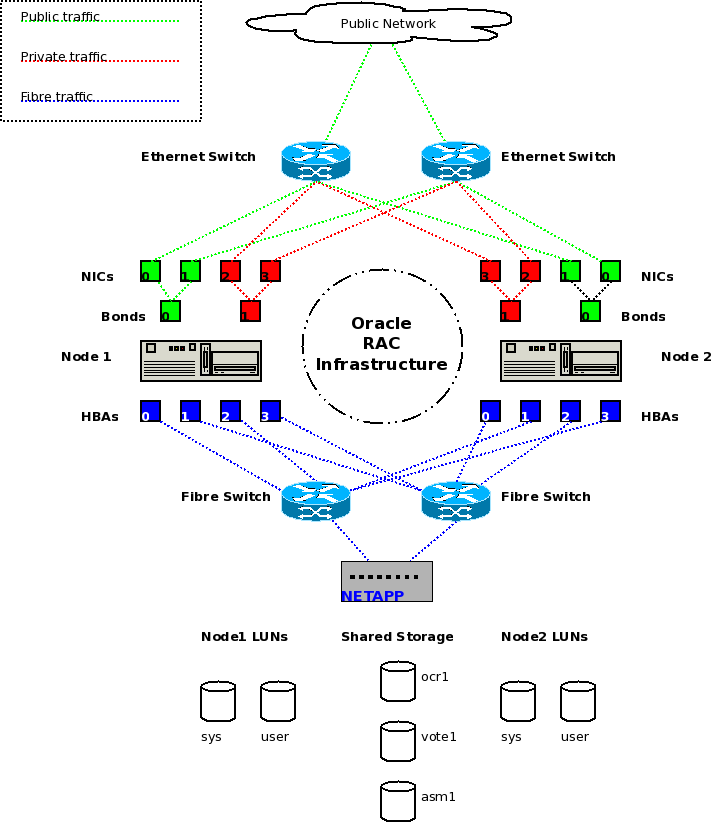
Create virtual guests
-
create two guests with @Base, @Gnome desktop and @Development Tools environment for the RAC nodes
-
2 nics for public bond0
-
2 nics for private bond1
-
1 nic for iscsi path 1
-
1 nic for iscsi path 2
-
create a guest with @base and cluster-storage child channel for the iscsi target
-
1 nic for public traffic
-
1 nic for iscsi path 1
-
1 nic for iscsi path 2
Create shared storage via iscsi
- Add one interface per path with a unique subnet**
[root@ractarget network-scripts]# ip route show
10.0.0.0/24 dev eth0  proto kernel  scope link  src 10.0.0.10
10.0.2.0/24 dev eth1  proto kernel  scope link  src 10.0.2.1
10.0.3.0/24 dev eth2  proto kernel  scope link  src 10.0.3.1
169.254.0.0/16 dev eth2  scope link
default via 10.0.0.5 dev eth0
- Add ocr, voting and asm disks**
[root@ractarget network-scripts]# sg_map -i -x
/dev/sg0  0 0 0 0  0  /dev/sda  QEMU     QEMU HARDDISK    0.11
/dev/sg1  0 0 1 0  0  /dev/sdb  QEMU     QEMU HARDDISK    0.11
/dev/sg2  0 0 2 0  0  /dev/sdc  QEMU     QEMU HARDDISK    0.11
[root@ractarget network-scripts]# fdisk -l | fgrep Disk
Disk /dev/sda doesn't contain a valid partition table
Disk /dev/sdb doesn't contain a valid partition table
Disk /dev/sdc doesn't contain a valid partition table
Disk /dev/hda: 8589 MB, 8589934592 bytes
Disk /dev/sda: 1073 MB, 1073741824 bytes
Disk /dev/sdb: 1073 MB, 1073741824 bytes
Disk /dev/sdc: 21.4 GB, 21474836480 bytes
-
Install packages on target**
-
yum install scsi-target-utils
-
chkconfig tgtd on
-
service tgtd start
-
Create Targets**
[root@ractarget ~]# cat /etc/rc.local
#!/bin/sh
#
# This script will be executed *after* all the other init scripts.
# You can put your own initialization stuff in here if you don't
# want to do the full Sys V style init stuff.

touch /var/lock/subsys/local

# Create targets

tgtadm --lld iscsi --op new --mode target --tid 1 -T iqn.2010-28.com.example:ocr
tgtadm --lld iscsi --op new --mode target --tid 2 -T iqn.2010-28.com.example:voting
tgtadm --lld iscsi --op new --mode target --tid 3 -T iqn.2010-28.com.example:asm

# Grant access to node(s) IP addresses for each target

tgtadm --lld iscsi --op bind --mode target --tid 1 -I 10.0.2.10
tgtadm --lld iscsi --op bind --mode target --tid 1 -I 10.0.2.20
tgtadm --lld iscsi --op bind --mode target --tid 2 -I 10.0.2.10
tgtadm --lld iscsi --op bind --mode target --tid 2 -I 10.0.2.20
tgtadm --lld iscsi --op bind --mode target --tid 3 -I 10.0.2.10
tgtadm --lld iscsi --op bind --mode target --tid 3 -I 10.0.2.20

tgtadm --lld iscsi --op bind --mode target --tid 1 -I 10.0.3.10
tgtadm --lld iscsi --op bind --mode target --tid 1 -I 10.0.3.20
tgtadm --lld iscsi --op bind --mode target --tid 2 -I 10.0.3.10
tgtadm --lld iscsi --op bind --mode target --tid 2 -I 10.0.3.20
tgtadm --lld iscsi --op bind --mode target --tid 3 -I 10.0.3.10
tgtadm --lld iscsi --op bind --mode target --tid 3 -I 10.0.3.20

# Add disks to individual targets

tgtadm --lld iscsi --op new --mode logicalunit --tid 1 --lun 1 -b /dev/sda
tgtadm --lld iscsi --op new --mode logicalunit --tid 2 --lun 1 -b /dev/sdb
tgtadm --lld iscsi --op new --mode logicalunit --tid 3 --lun 1 -b /dev/sdc
- Configure nics on nodes**
[root@racnode1 network-scripts]# cat ifcfg-eth4
# Realtek Semiconductor Co., Ltd. RTL-8139/8139C/8139C+
DEVICE=eth4
BOOTPROTO=none
ONBOOT=yes
HWADDR=52:54:00:78:fc:3a
IPADDR=10.0.2.10
NETMASK=255.255.255.0
[root@racnode1 network-scripts]# cat ifcfg-eth5
# Realtek Semiconductor Co., Ltd. RTL-8139/8139C/8139C+
DEVICE=eth5
BOOTPROTO=none
ONBOOT=yes
HWADDR=52:54:00:63:1f:77
IPADDR=10.0.3.10
NETMASK=255.255.255.0
[root@racnode2 network-scripts]# cat ifcfg-eth4
# Realtek Semiconductor Co., Ltd. RTL-8139/8139C/8139C+
DEVICE=eth4
BOOTPROTO=none
ONBOOT=yes
HWADDR=52:54:00:4d:e3:0b
IPADDR=10.0.2.20
NETMASK=255.255.255.0
[root@racnode2 network-scripts]# cat ifcfg-eth5
# Realtek Semiconductor Co., Ltd. RTL-8139/8139C/8139C+
DEVICE=eth5
BOOTPROTO=none
ONBOOT=yes
HWADDR=52:54:00:07:d8:83
IPADDR=10.0.3.20
NETMASK=255.255.255.0
-
Install packages on nodes**
-
yum install iscsi-initiator-utils
-
chkconfig iscsid on
-
service iscsid start
-
Login to targets on both nodes**
[root@racnode1 ~]# cat scripts/targetlogin.sh
iscsiadm -m discovery -t sendtargets -p 10.0.2.1
iscsiadm -m discovery -t sendtargets -p 10.0.2.1 -l
iscsiadm -m discovery -t sendtargets -p 10.0.3.1
iscsiadm -m discovery -t sendtargets -p 10.0.3.1 -l
[root@racnode1 ~]# iscsiadm --mode node
10.0.3.1:3260,1 iqn.2010-28.com.example:ocr
10.0.2.1:3260,1 iqn.2010-28.com.example:ocr
10.0.3.1:3260,1 iqn.2010-28.com.example:voting
10.0.2.1:3260,1 iqn.2010-28.com.example:voting
10.0.3.1:3260,1 iqn.2010-28.com.example:asm
10.0.2.1:3260,1 iqn.2010-28.com.example:asm
[root@racnode1 ~]# sg_map -i -x
/dev/sg0  0 0 0 0  12  IET       Controller  0001
/dev/sg1  1 0 0 0  12  IET       Controller  0001
/dev/sg2  2 0 0 0  12  IET       Controller  0001
/dev/sg3  0 0 0 1  0  /dev/sda  IET       VIRTUAL-DISK  0001
/dev/sg4  1 0 0 1  0  /dev/sdb  IET       VIRTUAL-DISK  0001
/dev/sg5  2 0 0 1  0  /dev/sdc  IET       VIRTUAL-DISK  0001
/dev/sg6  3 0 0 0  12  IET       Controller  0001
/dev/sg7  3 0 0 1  0  /dev/sdd  IET       VIRTUAL-DISK  0001
/dev/sg8  4 0 0 0  12  IET       Controller  0001
/dev/sg9  5 0 0 0  12  IET       Controller  0001
/dev/sg10  4 0 0 1  0  /dev/sde  IET       VIRTUAL-DISK  0001
/dev/sg11  5 0 0 1  0  /dev/sdf  IET       VIRTUAL-DISK  0001
- Setup multipath**
- yum -y install device-mapper-multipath
- multipath -v4
[root@racnode2 scripts]# multipath -ll
mpath8 (1IET_00020001) dm-3 IET,VIRTUAL-DISK
[size=1.0G][features=0][hwhandler=0][rw]
\_ round-robin 0 [prio=1][enabled]
 \_ 1:0:0:1 sdc 8:32  [active][ready]
\_ round-robin 0 [prio=1][enabled]
 \_ 4:0:0:1 sdd 8:48  [active][ready]
mpath7 (1IET_00010001) dm-2 IET,VIRTUAL-DISK
[size=1.0G][features=0][hwhandler=0][rw]
\_ round-robin 0 [prio=1][enabled]
 \_ 0:0:0:1 sda 8:0   [active][ready]
\_ round-robin 0 [prio=1][enabled]
 \_ 3:0:0:1 sde 8:64  [active][ready]
mpath6 (1IET_00030001) dm-1 IET,VIRTUAL-DISK
[size=20G][features=0][hwhandler=0][rw]
\_ round-robin 0 [prio=1][active]
 \_ 2:0:0:1 sdb 8:16  [active][ready]
\_ round-robin 0 [prio=1][enabled]
 \_ 5:0:0:1 sdf 8:80  [active][ready]
- Add aliases to multipath and restart**
[root@racnode1 ~]# cat /etc/multipath.conf | egrep -v ^\$
blacklist {
}
defaults {
	user_friendly_names yes
}
multipaths {
       	multipath {
               	wwid	1IET_00010001
               	alias   ocr1
       	}
        multipath {
                wwid	1IET_00020001
                alias	vote1
        }
        multipath {
                wwid	1IET_00030001
                alias   asm1
        }

}
- multipath -F
- multipath -v6
[root@racnode1 ~]# multipath -ll | fgrep -e DISK -e size
vote1 (1IET_00020001) dm-2 IET,VIRTUAL-DISK
[size=1.0G][features=0][hwhandler=0][rw]
ocr1 (1IET_00010001) dm-1 IET,VIRTUAL-DISK
[size=1.0G][features=0][hwhandler=0][rw]
asm1 (1IET_00030001) dm-3 IET,VIRTUAL-DISK
[size=20G][features=0][hwhandler=0][rw]
- Create raw mappings with rc.local**
[root@racnode1 ~]# cat /etc/rc.local
#!/bin/sh
#
# This script will be executed *after* all the other init scripts.
# You can put your own initialization stuff in here if you don't
# want to do the full Sys V style init stuff.

touch /var/lock/subsys/local
modprobe hangcheck-timer

#####
# Oracle Cluster Registry disk (ocr-prim)
#####
# for basic installation initially use:
chown root:dba /dev/sdd
chmod 660 /dev/sdd
raw /dev/raw/raw1 /dev/sdd
sleep 2
chown root:dba /dev/raw/raw1
chmod 660 /dev/raw/raw1

# after upgrade to at least Oracle 10.2.0.3 use:
#chown root:dba /dev/mapper/ocr-primp1
#chmod 660 /dev/mapper/ocr-primp1
#raw /dev/raw/raw1 /dev/mapper/ocr-primp1
#sleep 2
#chown root:dba /dev/raw/raw1
#chmod 660 /dev/raw/raw1

#####
# Oracle Cluster Voting disk (ocr-vote)
#####
# for basic installation initially use:
chown oracle:dba /dev/sdb
chmod 660 /dev/sdb
raw /dev/raw/raw2 /dev/sdb
sleep 2
chown oracle:dba /dev/raw/raw2
chmod 660 /dev/raw/raw2

# after upgrade to at least Oracle 10.2.0.3 use:
#chown oracle:dba /dev/mapper/ocr-votep1
#chmod 660 /dev/mapper/ocr-votep1
#raw /dev/raw/raw2 /dev/mapper/ocr-votep1
#sleep 2
#chown oracle:dba /dev/raw/raw2
#chmod 660 /dev/raw/raw2
- Before running the installer, check that your raw devices map to the OCR and Voting disks accordingly and fix if wrong
[root@racnode2 ~]# raw /dev/raw/raw2 /dev/sdb
/dev/raw/raw2:	bound to major 8, minor 16
[root@racnode2 ~]# raw /dev/raw/raw2 /dev/sdc
/dev/raw/raw2:	bound to major 8, minor 32
[root@racnode2 ~]# raw -qa
/dev/raw/raw1:	bound to major 8, minor 16
/dev/raw/raw2:	bound to major 8, minor 32
- chown oracle:dba /dev/raw/raw*
Add hostnames to /etc/hosts
[root@racnode2 network-scripts]# cat /etc/hosts
# Do not remove the following line, or various programs
# that require network functionality will fail.
127.0.0.1		localhost.localdomain localhost
::1		localhost6.localdomain6 localhost6

# public interfaces
10.0.0.60       racnode1.sat53.net      racnode1
10.0.0.61	racnode2.sat53.net	racnode2

# VIPS ... the installer will make interfaces for these
10.0.0.70	racnode1-vip.sat53.net	racnode1-vip
10.0.0.71	racnode2-vip.sat53.net	racnode2-vip

# private interconnects
10.0.1.1	racnode1-priv.sat53.net	racnode1-priv
10.0.1.2        racnode2-priv.sat53.net racnode2-priv
Set kernel parameters and shell limits
[root@racnode1 ~]# tail -n 15 /etc/sysctl.conf
#ORACLE RAC
kernel.core_uses_pid = 1
fs.file-max = 327680
net.core.rmem_max = 262144
net.core.wmem_max = 262144
net.core.rmem_default = 262144
net.core.wmem_default = 262144
net.ipv4.ip_local_port_range = 1024 65000
net.ipv4.ip_forward = 0
kernel.shmmax = 2147483648
kernel.shmmni = 4096
kernel.sem = 250 32000 100 128
net.ipv4.tcp_keepalive_time = 3000
net.ipv4.tcp_retries2 = 5
net.ipv4.tcp_syn_retries = 1
[root@racnode1 ~]# tail -n 5 /etc/security/limits.conf
#ORACLE RAC
oracle  soft    nofile  4096
oracle  hard    nofile  8192
oracle  soft    nproc   2047
oracle  hard    nproc   16384
- echo options hangcheck-timer hangcheck_tick=30 hangcheck_margin=180 /etc/modprobe.conf
- echo modprobe hangcheck-timer /etc/rc.local
Create oracle user and groups
- groupadd -g 500 dba
- useradd -c Oracle Software Owner -d /opt/oracle -g dba -u 500 oracle
- echo oracle | passwd –stdin oracle
[root@racnode2 ~]# id oracle
uid=500(oracle) gid=500(dba) groups=500(dba)
[root@racnode1 ~]# cat /opt/oracle/.bash_profile
ORACLE_SID=orcl1 # for node1, change it to orcl2 for node2 ...
ORACLE_BASE=/opt/oracle
ORACLE_HOME=$ORACLE_BASE/product/10.2.0/db_2
ORACLE_CRS=$ORACLE_BASE/product/10.2.0/crs
PATH=$PATH:$ORACLE_HOME/bin:$ORACLE_CRS/bin
LD_LIBRARY_PATH=$ORACLE_HOME/lib:$ORACLE_HOME/lib32
export ORACLE_BASE ORACLE_HOME PATH LD_LIBRARY_PATH ORACLE_SID
[root@racnode2 ~]# cat /opt/oracle/.bash_profile
ORACLE_SID=orcl2 # for node1, change it to orcl2 for node2 ...
ORACLE_BASE=/opt/oracle
ORACLE_HOME=$ORACLE_BASE/product/10.2.0/db_2
ORACLE_CRS=$ORACLE_BASE/product/10.2.0/crs
PATH=$PATH:$ORACLE_HOME/bin:$ORACLE_CRS/bin
LD_LIBRARY_PATH=$ORACLE_HOME/lib:$ORACLE_HOME/lib32
export ORACLE_BASE ORACLE_HOME PATH LD_LIBRARY_PATH ORACLE_SID
- run sshkey script on all nodes as the oracle user
[root@racnode1 ~]# cat /root/scripts/sshkeys.sh
ssh-keygen -t rsa -N  -f ~/.ssh/id_rsa
for I in 1 2; do
  ssh-copy-id -i ~/.ssh/id_rsa.pub racnode$I
done
Install Oracle packages
-
mkdir /root/packages
-
cd /root/packages
-
scp root@satellite:/mnt/ISO/Oracle/asm/* .
-
rpm -ivh oracleasm-support-2.1.3-1.el5.x86_64.rpm
-
rpm -ivh oracleasm-2.6.18-194.el5-2.0.5-1.el5.x86_64.rpm
-
rpm -ivh oracleasmlib-2.0.4-1.el5.x86_64.rpm
-
yum -y groupinstall Development Tools
-
yum -y install sysstat ntp net-snmp libaio screen libXp compat-libstdc++-33 glibc glibc-devel gcc gcc-c++ libstdc++ libgcc expat freetype zlib mesa-libGLU.i386 mesa-libGL.i386 xorg-x11-server-Xorg.i386 fontconfig.i386 libstdc++.i386 libgcc.i386 expat.i386 freetype.i386 zlib.i386 glibc-devel.i386
-
scp root@satellite:/mnt/ISO/Oracle/database/10201_clusterware_linux_x86_64.cpio.gz /root/packages/.
-
scp root@satellite:/mnt/ISO/Oracle/database/10201_database_linux_x86_64.cpio.gz /root/packages/.
-
echo Red Hat Enterprise Linux Server release 4 (Tikanga) /etc/redhat-release
Extract the installer and run
- mkdir -p /opt/oracle/media
- cd /opt/oracle/media
- zcat /root/packages/10201_clusterware_linux_x86_64.cpio.gz | cpio -idmv
- zcat /root/packages/10201_database_linux_x86_64.cpio.gz | cpio -idmv
Fix block devices
- dd if=/dev/zero of=/dev/raw/raw1 bs=125829120 count=1
- dd if=/dev/zero of=/dev/raw/raw2 bs=20971520 count=1
Issues
- installer says that the nodes are not clusterable and the terminal shows that rsh/ssh access was denied
- su into the oracle account and then try to ssh between nodes.
- If the /dev/null errors below happen, the oracle installer broke the device node and you need to reboot
su - oracle
/dev/null: Permission denied
/dev/null: Permission denied
/dev/null: Permission denied
/dev/null: Permission denied
/dev/null: Permission denied