legacy-wiki
RHEV
Recovered from the older tannerjc.net wiki snapshot dated January 23, 2016.
- Red Hat Enterprise Virtualization**
General Documentation
http://www.redhat.com/docs/en-US/Red_Hat_Enterprise_Virtualization/
RHEV Hypervisor
Appliance based on RHEL, can boot from PXE or be installed locally, but currently configuration must be stored locally. (in the future maybe we can integrate configuration into pxe)
- ovirt software is utilized by RHEV H.
- ovirt-node rpm contains all the oVirt software that is used by RHEV H.
- used for initialization process and to provide ovrit APIs
ovirt-node includes ovirt-config-setup which is used to configure the RHEV H the first time and can also be used after installation to reconfigure settings.
Red Hat Enterprise Virtualization Hypervisor release 5.5-2.2 (5.2)

 Hypervisor Configuration Menu

1) Configure authentication            5) Configure the host for RHEV
2) Set the hostname                    6) View logs
3) Networking setup                    7) Exit Hypervisor Configuration Menu
4) Register Host to RHN
Choose an option to configure:
oVrt has similar goals/capbilities as RHEV. Red Hat chose to use RHEV on the market instead or oVirt after Red Hat acquired Qumranet which built KVM and SolidICE (Desktop Virtualization Desktop Infrastructure) of which RHEV is built on. Red Hat Acquires Qumranet
RHEV Manager
- built with .NET and C#
- Runs on Windows Server only
- WPF client delivers binary from the server to client and run within Internet Explorer
Virtual Machines
-
CPU usage
-
value comes from CPU usage from the KVM process.
-
KVM creates a separate thread for each VCPU. So if you create a KVM guest with 2 VCPUs in top it could show up to 200% CPU usage.
-
We don’t want to display VM CPU usage over 100% as this would be confusing so RHEV does factorizing by dividing the number of cores on the host by the CPU usage of the KVM process.
-
CPU usage seen in RHEV M may also include CPU usage of the Spice thread.
-
effectively CPU usage for A VM only shows the percentage of the entire host CPU usage that the VM is using.
-
guest with 1 VCPU on a host with 8 cores would never show much more than 12.5% CPU usage (plus maybe a little for Spice process)
-
Network Usage
-
Value is derived using similar factorizing of the network usage a VM is using based on the type of network the guest has
-
virtio has one value which is divided into the guest’s network usage, rtl8139 has another value
-
Memory usage
-
It’s not easy to see real memory usage (non shared/cached) of a guest from the host
-
Windows guests
-
usage available when RHEV-tools are installed inside the Windows guest
-
can see real application memory usage from within
-
is not factorized against total host memory
-
this way we can see if a guest is swapping or over utilized in memory
-
we don’t factorize for Memory because we need to know if a system is swapping because this is very bad, especially if we are swapping over network
-
Linux guests show no Memory usage because we don’t have RHEV-tools for Linux
-
IP Address is only available for Windows guests that have RHEV-tools installed.
Cluster
-
Hosts that have the same resources available to them
-
storage domain
-
logical networks
-
High availability domain
-
we can use power fencing to shutdown or restart a non-responsive host
-
Migration Domain
-
can migrate a guest from one host to another host based on Service Level usage of a host
Define a new cluster by going to the cluster tab, click new
set name and description as desired set the Data Center which defines what storage the hosts in the cluster will be connected to.
-
Memory Over Commit
-
Share memory pages between guests that share similar pages
-
Desktop load 200% which assumes we have a master corporate image where guests will share many pages.
-
Example 16 GB host could allow guests to use 32 GB of memory
-
Server load 150%
-
CPU Name is
-
Derived from existing CPUs that have a known set of flags
-
Defines a level of the cluster
-
Minimum set of flags that all hosts in the cluster have in common
-
If one host doesn’t meet the lowest CPU Name, the host will be non-operational
-
Cluster Policy
-
None - Guests are distributed in a round robin fashion as they are started, after power up there is no redistribution across hosts
-
Even distribution - Set maximum service level so that if a guest
Cluster policy
- Automatically migrate VMs depending on usage of the hosts
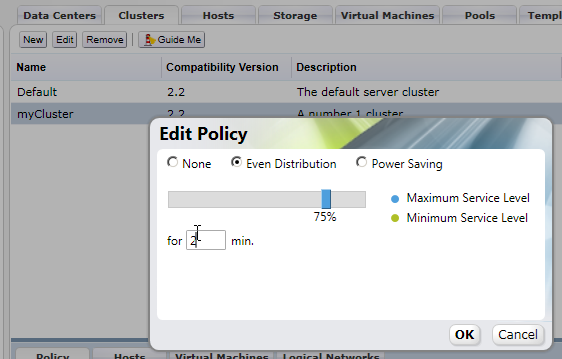
- Host usage is checked every 2 seconds
- Set for ___ min. to the period of time to calculate the average service level which is used to determine when to migrate VMs
- Two minutes is probably too short of a period to calculate the average, because migrating VMs is CPU intensive. It isn’t worth increasing CPU usage to lower the services level constantly as that will increase usage itself
- Minimum service level can also be set to move VMs off of a host that is not being utilized
- RHEV does not automatically shutdown hosts that are below the Minimum service level yet. you must use Power Shell to do this
Tags
- You can use CTRL to hilight multiple VMs and apply tags to more than one VM at a time
VDSM
- VDSM is the proprietary protocol used to communicate between the RHEV Manager and RHEV Hypervisors or RHEL hosts running RHEV*
- handles control of VMs like libvirt/virsh on RHEL Hosts and management of storage/hosts in addition.
- In RHEV 2.3 VDSM will do storage/host control, but libvirt/virsh will do VM control.
[root@rhevhost vdsm]# rpm -qa | grep vds
vdsm22-reg-4.5-62.9.el5_5rhev2_2
vdsm22-cli-4.5-62.9.el5_5rhev2_2
vdsm22-4.5-62.9.el5_5rhev2_2
[root@rhevhost vdsm]# rpm -q vdsm22 -i
Name        : vdsm22                       Relocations: (not relocatable)
Version     : 4.5                               Vendor: Red Hat, Inc.
Release     : 62.9.el5_5rhev2_2             Build Date: Mon Jul 26 08:17:30 2010
Install Date: Mon Jul 26 15:51:37 2010         Build Host: x86-007.build.bos.redhat.com
Group       : Applications/System           Source RPM: vdsm22-4.5-62.9.el5_5rhev2_2.src.rpm
Size        : 2605444                          License: GPLv2+
Signature   : DSA/SHA1, Mon Jul 26 15:19:33 2010, Key ID 5326810137017186
Packager    : Red Hat, Inc. http://bugzilla.redhat.com/bugzilla
URL         : http://git.engineering.redhat.com/?p=users/bazulay/vdsm.git
Summary     : Virtual Desktop Server Manager
Description :
The VDSM service is required by a RHEV Manager to manage RHEV Hypervisors
and Red Hat Enterprise Linux hosts. VDSM manages and monitors the host's
storage, memory and networks as well as virtual machine creation, other host
administration tasks, statistics gathering, and log collection.
[root@rhevhost vdsm]# rpm -qi vdsm22-reg -i
Name        : vdsm22-reg                   Relocations: (not relocatable)
Version     : 4.5                               Vendor: Red Hat, Inc.
Release     : 62.9.el5_5rhev2_2             Build Date: Mon Jul 26 08:17:30 2010
Install Date: Mon Jul 26 15:51:37 2010         Build Host: x86-007.build.bos.redhat.com
Group       : Applications/System           Source RPM: vdsm22-4.5-62.9.el5_5rhev2_2.src.rpm
Size        : 151602                           License: GPLv2+
Signature   : DSA/SHA1, Mon Jul 26 15:19:33 2010, Key ID 5326810137017186
Packager    : Red Hat, Inc. http://bugzilla.redhat.com/bugzilla
URL         : http://git.engineering.redhat.com/?p=users/bazulay/vdsm.git
Summary     : VDSM registration package
Description :
VDSM registration package. Used to register a RHEV hypervisor to a RHEV
[root@rhevhost vdsm]# rpm -qi vdsm22-cli
Name        : vdsm22-cli                   Relocations: (not relocatable)
Version     : 4.5                               Vendor: Red Hat, Inc.
Release     : 62.9.el5_5rhev2_2             Build Date: Mon Jul 26 08:17:30 2010
Install Date: Mon Jul 26 15:51:30 2010         Build Host: x86-007.build.bos.redhat.com
Group       : Applications/System           Source RPM: vdsm22-4.5-62.9.el5_5rhev2_2.src.rpm
Size        : 392179                           License: GPLv2+
Signature   : DSA/SHA1, Mon Jul 26 15:19:33 2010, Key ID 5326810137017186
Packager    : Red Hat, Inc. http://bugzilla.redhat.com/bugzilla
URL         : http://git.engineering.redhat.com/?p=users/bazulay/vdsm.git
Summary     : VDSM command line interface
Description :
Call VDSM commands from the command line. Used for testing and debugging.
vdsm22-cli provides vdsClient which is very useful for debugging as the description says
[root@rhevhost vdsm]# rpm -qf `which vdsClient`
vdsm22-cli-4.5-62.9.el5_5rhev2_2/pre

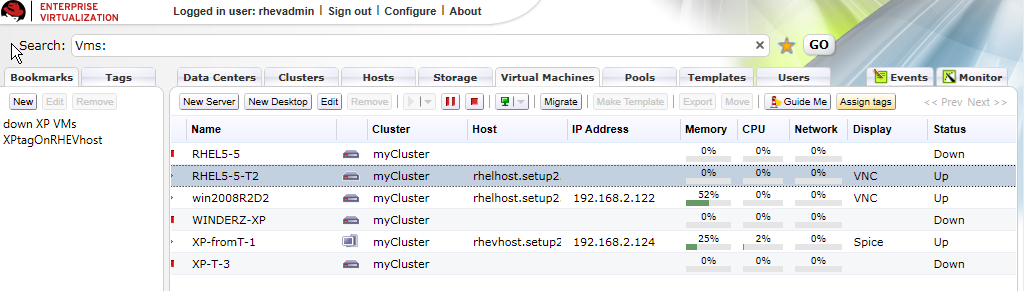
RHEV uses UUID's to refer to Virtual Machines. To find out the UUID for a VM based on the VM name as seen in RHEV M:
[[File:RHEVM-VMs.png]]

[root@rhevhost vdsm]# vdsClient -s 0 list table
9b3b6311-838c-45e2-a7c5-75956a33199a   5382  win2008R2D2          Up
[root@rhelhost vdsm]# vdsClient -s 0 list table
d24c842c-2bf5-4ae8-b319-6d188a67b32f  14649  RHEL5-5              Up
c4eb8a5f-ef7a-49c4-ab8f-bee2322047af  13717  WINDERZ-XP           Up                   192.168.2.121
-s is for secure and 0 means localhost. You can use vdsClient to connect to other hosts too:
[root@rhelhost ~]# vdsClient -s 192.168.2.20 list table
957432be-5ee0-4c23-8285-894f7f1ea269  17381  RHEL5fakehostb       Up
ab905d7e-d26b-413d-bc17-b816a9030501  11147  ourxppool-2          Up
4710f354-abcb-4ee4-a01d-5f339a35e14b  11301  ourxppool-4          Up
0b87a009-dce6-4c08-8a2b-f272c1228e2e  12963  ourxppool-1          Up

[root@rhelhost ~]# vdsClient -s 192.168.2.10 list table
93e9ae94-83e6-428d-ba7c-a917d017e781   4683  ourxppool-5          Up
199fa7fc-15a5-4036-8c08-e01ad44700ba  28993  XP-fromT-1           Up                   192.168.2.124
After you know the UUID for the VM name you are interested in you can get stats about it:
[root@rhevhost vdsm]# vdsClient -s 0 getVmStats 9b3b6311-838c-45e2-a7c5-75956a33199a

9b3b6311-838c-45e2-a7c5-75956a33199a
        Status = Running
        username = Administrator@WIN-BFI3ME40HMS
        memUsage = 50
        acpiEnable = true
        pid = 5382
        rxRate = 0.00
        cdrom = /rhev/data-center/fbf8cf68-f4ab-4b9c-8b64-d6b21f651698/b6c81a36-ff59-4bed-a41b-25e1ef45e6a2/images/11111111-1111-1111-1111-111111111111/RHEV-toolsSetup_2.2_46140.iso
        session = Unknown
        displayPort = 5910
        displaySecurePort = 5890
        timeOffset = -25200
        network = {'virtio_10_1': {'macAddr': '00:1a:4a:a8:02:02', 'name': 'virtio_10_1', 'txDropped': '58', 'rxErrors': '0', 'txRate': '1.18758043423e-05', 'rxRate': '0.0', 'txErrors': '0', 'state': 'unknown', 'speed': '1000', 'rxDropped': '0'}}
        displayType = vnc
        cpuUser = 0.00
        boot = dcn
        elapsedTime = 63138
        vmType = kvm
        cpuSys = 0.12
        appsList = ['RHEV-Tools 2.2.46140', 'RHEV-Network64 2.2.46140', 'RHEV-Block64 2.2.46140', 'RHEV-Agent64 2.2.46140']
        guestOs = Win 2008 R2
        nice = 0
        txDropped = 7.17
        displayIp = 0
        txRate = 0.00
        lastLogout = 1282093084.12
        lastUser = Unknown
        guestIPs = 192.168.2.122
        kvmEnable = True
        rxDropped = 0.00
        disks = {'ide0-hd0': {'readRate': '0.00', 'truesize': '13958643712', 'apparentsize': '13958643712', 'writeRate': '0.00', 'imageID': 'fac47e7d-74b4-4107-aa2a-13598fee386d'}, 'sd0': {'readRate': '0.00', 'truesize': '', 'apparentsize': '', 'writeRate': '0.00', 'imageID': ''}, 'floppy0': {'readRate': '0.00', 'truesize': '', 'apparentsize': '', 'writeRate': '0.00', 'imageID': ''}, 'ide1-cd0': {'readRate': '0.00', 'truesize': '', 'apparentsize': '', 'writeRate': '0.00', 'imageID': ''}}
        monitorResponse = 0
        guestName = WIN-BFI3ME40HMS
        cpuIdle = 100.00
        lastLogin = 1282093842.7
        clientIp =
        display = 10
Shutting down a VM with vdsClient
[root@rhelhost ~]# vdsClient -s 0 shutdown 8bfe59c5-5e4c-4e35-bb84-335e4a895d6e 0 bye
Machine shut down
[root@rhelhost ~]# vdsClient -s 0 list table
93e9ae94-83e6-428d-ba7c-a917d017e781   4683  ourxppool-5          Up
9dacdd70-4261-4ae2-b494-6d97e388b446  10367  win2008R2D2          Up
199fa7fc-15a5-4036-8c08-e01ad44700ba  28993  XP-fromT-1           Up                   192.168.2.124
8bfe59c5-5e4c-4e35-bb84-335e4a895d6e  17574  RHEL5-5-T2           Up
[root@rhelhost ~]# vdsClient -s 0 shutdown  9dacdd70-4261-4ae2-b494-6d97e388b446 5 BYEBYE
Machine shut down
Host Storage
- All guest storage is under /rhev/data-center.
- Local storage is only for RHEV-H or RHEL Host configuration.
- RHEV supports FC, iSCSI, NFS.
- Multipath is used automatically for all relevant storage
Storage Pool Manager
- SPM runs on only one RHEV H or RHEL host
- SPM is the only thing allowed to run LVM commands like changing the size of LVs.
- SPM can only change the size of an LV in half a gigabyte chunks
Host Storage Manager
- HSM is the local storage manager that runs on all hosts
- HSM runs validation
- HSM logs in to iSCSI
- HSM mounts NFS
- HSM checks status of iSCSI
Storage Domains
-
ISO Domain
-
stores installation ISOs or CD ISOs to present to guests (rhev-tools)
-
must be of type NFS
-
Data Domain
-
guest images
-
Export Domain
-
used to import and export Virtual machines
Guest image Format and Allocation types
- qcow2 definition for background**
The QCOW image format is one of the disk image formats supported by the QEMU processor emulator.
It is a representation of a fixed size block device in a file. Benefits it offers over using raw dump representation include:

   1. Smaller file size, even on filesystems which don't support holes (i.e. sparse files)
   2. Copy-on-write support, where the image only represents changes made to an underlying disk image/pre

This is from the RHEV Administration Guide by Red Hat:
Virtual disks can have one of two formats, either Qcow2 or Raw. The type of storage can be either Sparse or Preallocated.
Snapshots are always sparse but can be taken for disks created either as raw or sparse.

Pre-allocated or RAW is the recommended selection for a virtual machine, where a block of disk space is reserved for the virtual machine.
Thin Provision or Qcow2 option, allocates disk space on the fly, as and when the virtual machine requires it.

   1.
      Sparse or Preallocated or Thin Provisioning
      A Preallocated disk has reserved storage of the same size as the virtual disk itself.
This results in better performance because no storage allocation is required during runtime.
      On SAN (iSCSI, FCP) this is achieved by creating a block device with the same size as the virtual disk. On NFS this is achieved by filling the backing file with zeros and
 assuming that backing storage is not Qcow2 and does not de-duplicate zeros (If these assumptions are incorrect, do not select Sparse for NFS virtual disks).
      For sparse virtual disks backing storage is not reserved and is allocated as needed during runtime.
This allows for storage over commitment under the assumption that most disks are not fully utilized and storage capacity can be utilized better.
This requires the backing storage to monitor write requests and can cause some performance issues.
On NFS backing storage is achieved simply by using files. On SAN this is achieved by creating a block device smaller than the virtual disk's defined size and communicating
with the hypervisor to monitor necessary allocations. This does not require support from the underlying storage devices.
   2.
      Raw
      For raw virtual disks the backing storage device (file/block device) is presented as is to the virtual machine with no additional layering in between.
 This gives better performance but has several limitations.
v2v export of KVM/libvirt guest
Example of exporting a stand alone KVM/libvirt guest from a RHEL 5.5 host to RHEV using v2v.
On the RHEL 5.5 KVM/libvirt host run the following to export the shutdown RHEL-Migrate guest.
virt-v2v -o rhev -osd localhost:/exports/fornfs/exports --network rhevm RHEL-Migrate
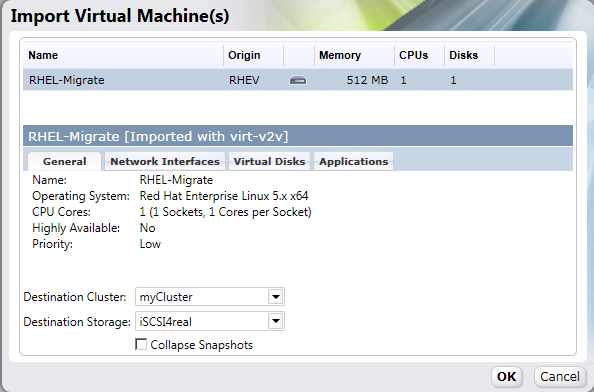
Import of guest from Export domain
After virt-v2v copy/conversion to the NFS export domain on the RHEV M:
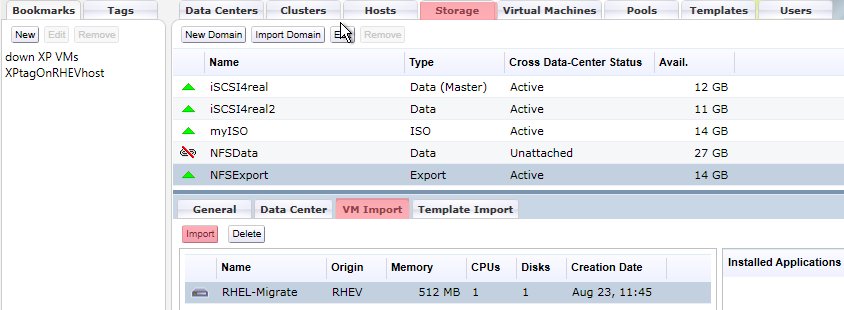
Guest Config Files
RHEV Uses Open Virtual Format to store information about guests Open Virtualization Format
Guest config files have .ovf file extension, we can use tree against the host storage to find them:
[root@rhelhost ~]# sudo -u vdsm tree /rhev/data-center/
/rhev/data-center/
|-- fbf8cf68-f4ab-4b9c-8b64-d6b21f651698
|   |-- 0debba0d-0766-4e19-a247-0936662c56ff - /rhev/data-center/mnt/control.setup2.example.com:_exports_fornfs_exports/0debba0d-0766-4e19-a247-0936662c56ff
|   |-- 32dfef07-8ea6-492f-ae55-b8668bb6c1d8 - /rhev/data-center/mnt/blockSD/32dfef07-8ea6-492f-ae55-b8668bb6c1d8
|   |-- b3587abe-e7ba-4ab3-bfdc-d3701c106616 - /rhev/data-center/mnt/blockSD/b3587abe-e7ba-4ab3-bfdc-d3701c106616
|   |-- b6c81a36-ff59-4bed-a41b-25e1ef45e6a2 - /rhev/data-center/mnt/control.setup2.example.com:_exports_fornfs_iso/b6c81a36-ff59-4bed-a41b-25e1ef45e6a2
|   |-- mastersd - 32dfef07-8ea6-492f-ae55-b8668bb6c1d8
|   |-- tasks - mastersd/master/tasks
|   `-- vms - mastersd/master/vms
|-- hsm-tasks
`-- mnt
    |-- blockSD
    |   |-- 32dfef07-8ea6-492f-ae55-b8668bb6c1d8
    |   |   |-- dom_md
    |   |   |   |-- ids - /dev/32dfef07-8ea6-492f-ae55-b8668bb6c1d8/ids
    |   |   |   |-- inbox - /dev/32dfef07-8ea6-492f-ae55-b8668bb6c1d8/inbox
    |   |   |   |-- leases - /dev/32dfef07-8ea6-492f-ae55-b8668bb6c1d8/leases
    |   |   |   |-- master - /dev/32dfef07-8ea6-492f-ae55-b8668bb6c1d8/master
    |   |   |   |-- metadata - /dev/32dfef07-8ea6-492f-ae55-b8668bb6c1d8/metadata
    |   |   |   `-- outbox - /dev/32dfef07-8ea6-492f-ae55-b8668bb6c1d8/outbox
    |   |   |-- images
    |   |   |   |-- 31e8b6a4-9191-48d7-8fa2-14b3b239cdd6
    |   |   |   |   `-- a72acc43-0f70-433f-915f-04062f664760 - /dev/32dfef07-8ea6-492f-ae55-b8668bb6c1d8/a72acc43-0f70-433f-915f-04062f664760
    |   |   |   |-- f9b25473-45a2-4cdc-be1e-036236c43882
    |   |   |   |   `-- 342ba229-3877-4180-bfdd-8818e5874241 - /dev/32dfef07-8ea6-492f-ae55-b8668bb6c1d8/342ba229-3877-4180-bfdd-8818e5874241
    |   |   |   `-- fac47e7d-74b4-4107-aa2a-13598fee386d
    |   |   |       `-- 2f33a475-4abd-450f-be14-df9c31075422 - /dev/32dfef07-8ea6-492f-ae55-b8668bb6c1d8/2f33a475-4abd-450f-be14-df9c31075422
    |   |   `-- master
    |   |       |-- lost+found [error opening dir]
    |   |       |-- tasks
    |   |       `-- vms
    |   |           |-- 3dd641f1-b0c7-4ffb-ba1a-0f2e113961c7
    |   |           |   `-- 3dd641f1-b0c7-4ffb-ba1a-0f2e113961c7.ovf
    |   |           |-- 55effff5-1db7-49f8-901b-928b4c2dd89e
    |   |           |   `-- 55effff5-1db7-49f8-901b-928b4c2dd89e.ovf
    |   |           |-- 9b3b6311-838c-45e2-a7c5-75956a33199a
    |   |           |   `-- 9b3b6311-838c-45e2-a7c5-75956a33199a.ovf
    |   |           |-- c4eb8a5f-ef7a-49c4-ab8f-bee2322047af
    |   |           |   `-- c4eb8a5f-ef7a-49c4-ab8f-bee2322047af.ovf
    |   |           `-- d24c842c-2bf5-4ae8-b319-6d188a67b32f
    |   |               `-- d24c842c-2bf5-4ae8-b319-6d188a67b32f.ovf
    |   `-- b3587abe-e7ba-4ab3-bfdc-d3701c106616
    |       |-- dom_md
    |       |   |-- ids - /dev/b3587abe-e7ba-4ab3-bfdc-d3701c106616/ids
    |       |   |-- inbox - /dev/b3587abe-e7ba-4ab3-bfdc-d3701c106616/inbox
    |       |   |-- leases - /dev/b3587abe-e7ba-4ab3-bfdc-d3701c106616/leases
    |       |   |-- master - /dev/b3587abe-e7ba-4ab3-bfdc-d3701c106616/master
    |       |   |-- metadata - /dev/b3587abe-e7ba-4ab3-bfdc-d3701c106616/metadata
    |       |   `-- outbox - /dev/b3587abe-e7ba-4ab3-bfdc-d3701c106616/outbox
    |       `-- images
    |           |-- b39f4481-518c-4474-aa23-f8fb4d5671cc
    |           |   |-- 65085158-686b-43dc-895d-1953d9ab4964 - /dev/b3587abe-e7ba-4ab3-bfdc-d3701c106616/65085158-686b-43dc-895d-1953d9ab4964
    |           |   `-- 9f828609-164e-4f2f-bc8a-b4b5bb8fe6bc - /dev/b3587abe-e7ba-4ab3-bfdc-d3701c106616/9f828609-164e-4f2f-bc8a-b4b5bb8fe6bc
    |           `-- bbd97472-5054-4a6d-bc5d-db046d2af5de
    |               `-- 73820df1-d9c3-4af9-a2eb-ef55dd550c12 - /dev/b3587abe-e7ba-4ab3-bfdc-d3701c106616/73820df1-d9c3-4af9-a2eb-ef55dd550c12
    |-- control.setup2.example.com:_exports_fornfs_exports
    |   `-- 0debba0d-0766-4e19-a247-0936662c56ff
    |       |-- dom_md
    |       |   |-- ids
    |       |   |-- inbox
    |       |   |-- leases
    |       |   |-- metadata
    |       |   `-- outbox
    |       |-- images
    |       `-- master
    |           |-- tasks
    |           `-- vms
    `-- control.setup2.example.com:_exports_fornfs_iso
        `-- b6c81a36-ff59-4bed-a41b-25e1ef45e6a2
            |-- dom_md
            |   |-- ids
            |   |-- inbox
            |   |-- leases
            |   |-- metadata
            |   `-- outbox
            `-- images
                `-- 11111111-1111-1111-1111-111111111111
                    |-- RHEV-toolsSetup_2.2_46140.iso
                    |-- SW_DVD5_Windows_Svr_DC_EE_SE_Web_2008R2_64-bit_English_X15-59754.ISO
                    |-- en_win_xp_pro_with_sp2_vl.iso
                    `-- virtio-drivers-1.0.0-45801.vfd

43 directories, 37 files
We can see the ovf files are in /rhev/data-center/mnt/blockSD/32dfef07-8ea6-492f-ae55-b8668bb6c1d8/master/vms/
They are not indented properly so to view them easily use firefox or other XML editor.
vdsClient only shows VM info for VMs running on a host. If the VM is not running using the information in /rhev/data-center can be useful to find out information about a non-running VM (say if it is in a bad state)
How to find out the meaning of values in tree /rhev/data-center.
Say we want to know what StorageID UUID is in use for a particular VM:
First grep for the VM name from the directory with all the ovf files to find out which file is stores information for the VM
I know my VM name from looking at Virtual Machine tab in RHEV M
[root@rhelhost doc]# grep -R RHEL5-5  /rhev/data-center/mnt/blockSD/32dfef07-8ea6-492f-ae55-b8668bb6c1d8/master/vms/*
/rhev/data-center/mnt/blockSD/32dfef07-8ea6-492f-ae55-b8668bb6c1d8/master/vms/d24c842c-2bf5-4ae8-b319-6d188a67b32f/d24c842c-2bf5-4ae8-b319-6d188a67b32f.ovf
snip
open up the ovf file in firefox or some other XML editor You will see:
rasd:StorageIdb3587abe-e7ba-4ab3-bfdc-d3701c106616/rasd:StorageId
rasd:StoragePoolIdfbf8cf68-f4ab-4b9c-8b64-d6b21f651698/rasd:StoragePoolId
From RHEV-M looking under the Storage tab we can count how many VMs and templates are in use for a particular StorageID. Then we can grep recursively for the UUID above out of the vms directory to figure out how many instances of that UUID are in use in the ovf files, whatever UUID sum is equivalent to the number of templates and VMs in use in a StorageID is the UUID of that StorageID
[root@rhelhost doc]# grep --color -R b3587abe-e7ba-4ab3-bfdc-d3701c106616  /rhev/data-center/mnt/blockSD/32dfef07-8ea6-492f-ae55-b8668bb6c1d8/master/vms/* | wc -l
2
Now look in RHEV M for an StorageID that only has two VMs and Templates:
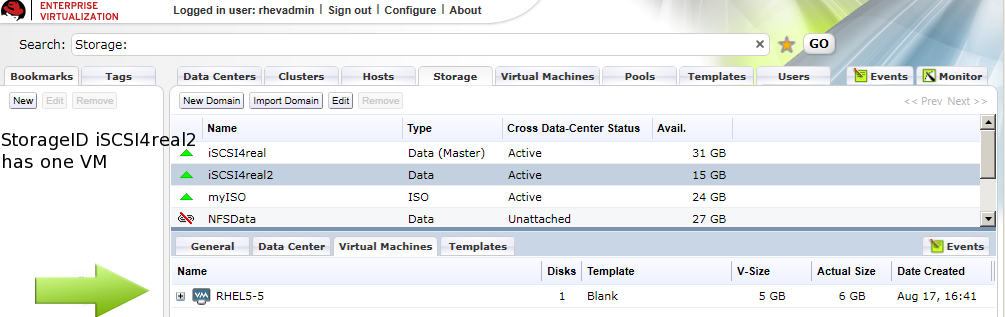
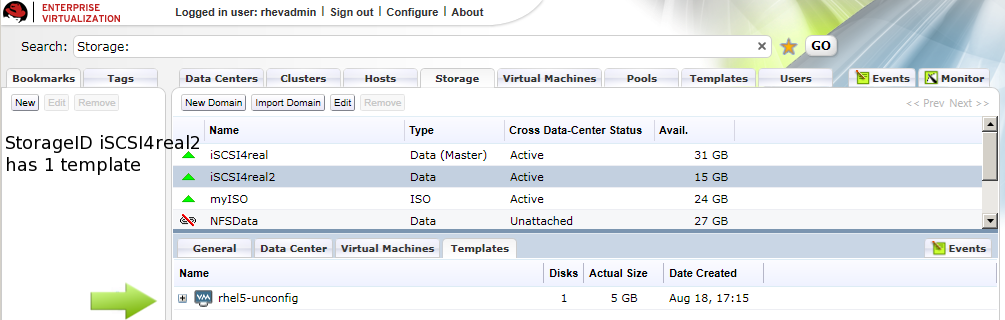
So we know iSCSI4real2 has UUID fbf8cf68-f4ab-4b9c-8b64-d6b21f651698
StorageID == actual NFS/iSCSI/FC storage device hosts connect to StoragePoolID == Data Center which contains Storage
Networking
-
VDSM allows one migration at a time per core on the destination host
-
migration happens on the rhevm network, it can saturate the network such that the hosts can’t communicate with the RHEV-M properly.
-
VDSM has a 5 min (300 sec) timeout on migration.
-
KVM has a capability to throttle the migration of memory transferred over the network
-
VDSM uses this capability (not sure what the cap is, maybe 40 mbits/s)
-
RDP
-
on A VM, RDP port must be open on VM if clients are to connect to VM for guest
-
USB Redirection
-
on a VM, USB redirection port must be open on VM if clients want to send USB devices to the VM
-
USB redirection is odd in that the USB server runs on the client that the user is connecting from and the USB client runs on the VM
-
if USB redirection isn’t working, it is either because the tools are not installed or the USB redirection port is not open
-
Logical Networks
-
Equivalent to a Bridge on the Host, the bridge can reside on a physical interface, a bond, or a VLAN.
-
Are assigned to a cluster. All hosts in a cluster will have the same Logical Networks
-
When creating a New Logical Network in RHEV M don’t use Default Gateway because it applies the gateway to /etc/sysconfig/network instead of /etc/sysconfig/network-scripts/ifcfg-* which can break the rest of the networks. In RHEL you can set gateways per interface, but not yet in RHEV.
-
Bonding
-
Bonding is a host side attribute, not a cluster attribute. while all hosts in the cluster have to have the same Logical network, bonding is the only thing that
Templates
- Blank Templates
- All VMs have a template when first created even if not created from a template, it is blank which is just a placed holder in the database. snapshot is just a modify on write (copy on write) file
- You should create a template for any VMs that are likely to have similar files on them.
- Any VM
Spice/Desktop/Users
- Desktop VMs can have users and groups of users added to them so that they can connect over Spice through the User Portal
- Server VMs can not have users or groups added to them and thus cannot be logged into over the User Portal using Spice
- Spice can’t do ALL USB devices, like “composite” USB devices, if it requires a special driver in windows we may not be able to use it with spice.. **if you hook it up and it has one USB device, you install the driver and you have three, spice probably can’t work with that.
- spice on windows client will offload as much work from the host to the client as possible
- spice on linux is all software rendering, we do no offloading
PowerShell
- Can do everything the RHEV-M WPF GUI does and more
- It connects directly to the back end
- Use RHEVM PSsnapin extensions
- Login
Login-User username password domain

Get all rhevmpssnapin commands
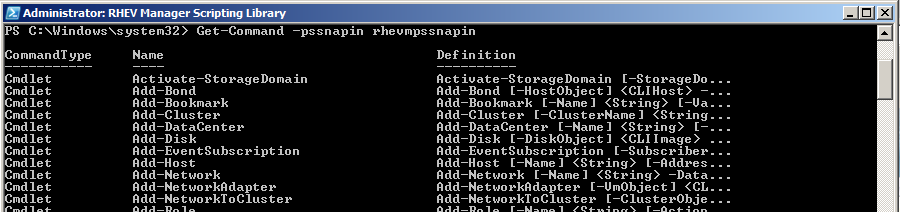
show all commands that contain Select-
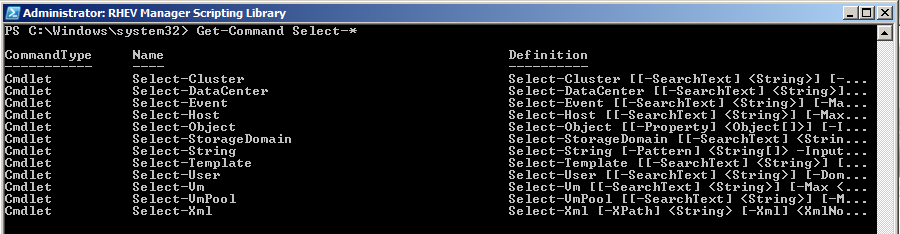
show all commands that contain Get- using ‘findstr’ which is like grep

Other
Guest MAC enumeration
#!/bin/bash

##
# Authored by James Tanner and Derrick Ornelas
# This script is for adding dns/dhcp entries using cobbler for guests of a RHEV system. RHEV sets the MAC of a guest to:
# First three octets are for Manufacturer Qumranet.
# The fourth octet comes from second octet of the IP address of the RHEV-M.
# The fith octet comes from the third octet of the IP address of the RHEV-M.
# The sixth and last octet comes from the guests as they are created, in order on RHEV
##

for i in `seq 2 6`; do

	echo ######### $i

	echo  		control.setup$i.example.com		192.168.$i.1
	echo  			rhelhost.setup0$i.example.com		192.168.$i.10
	echo                    	rhevhost.setup0$i.example.com         	192.168.$i.10

	for s in `seq  0 9`; do

		guestname=guest$s.setup$i.example.com

		thirdoctet=$i
		fourthoctet=`echo '1'$i'0' + $s | bc`
		guestmac=00:1A:4A:A8:0$i:0`printf %x $s`

		echo 			$guestname	$guestip	$guestmac

#		cobbler system add --name=$guestname --profile=rhel5-x86_64
	        cobbler system edit --name=$guestname --mac=$guestmac --ip=192.168.$thirdoctet.$fourthoctet --dns-name=guest$fourthoctet.setup$thirdoctet.example.com

	done
done
Troubleshooting
-
Non Operational = something within the cluster is not acceptable for the type of the cluster, missing resources that were not configured properly. For example, if you create a Logical Network in RHEV M but don’t attach the Logical Network to Physical Networks on the RHEV H or RHEL Hosts.
-
when installing a RHEV H or RHEL Host, after installation and reboot the RHEV M shows it as “Rebooting” for at least 2 minutes even if it has already rebooted in less than 2 minutes
Logging
Host Logs
[root@rhevhost ~]# ls /var/log/vdsm
backup        vdsm.log        vdsm.log.11.gz  vdsm.log.14.gz  vdsm.log.17.gz  vdsm.log.2.gz   vdsm.log.3.gz  vdsm.log.6.gz  vdsm.log.9.gz
metadata.log  vdsm.log.1.gz   vdsm.log.12.gz  vdsm.log.15.gz  vdsm.log.18.gz  vdsm.log.20.gz  vdsm.log.4.gz  vdsm.log.7.gz
spm-lock.log  vdsm.log.10.gz  vdsm.log.13.gz  vdsm.log.16.gz  vdsm.log.19.gz  vdsm.log.21.gz  vdsm.log.5.gz  vdsm.log.8.gz
vdsm.log
- Each line begins with a Thread number. This is the thread for whatever command was run. It makes it easy to track specific commands in the logs
- Run and Protect indicates that this command must finish before other commands can be run
- VDSM uses dd command to read metadata and status information off the storage devices, thus logs are filled with dd operations which can usually be ignored.
Main Thread starting vdsm
MainThread::INFO::2010-08-16 19:58:41,950::vdsm::91::vds::VDSM main thread ended. Waiting for 0 other threads...
MainThread::INFO::2010-08-16 19:58:41,950::vdsm::94::vds::_MainThread(MainThread, started)
MainThread::INFO::2010-08-16 23:05:59,824::vdsm::37::vds::I am Watchdog - vdsm pid is 7046
MainThread::INFO::2010-08-16 23:05:59,824::vdsm::49::vds::I am the actual vdsmd
MainThread::DEBUG::2010-08-16 23:06:25,065::threadPool::26::irs::(threadPool:init) Enter - numThreads: 10.0, waitTimeout: 3, maxTasks: 500.0
MainThread::DEBUG::2010-08-16 23:06:25,077::spm::195::irs::(SPM.__cleanup) cleaning links; [] []
MainThread::DEBUG::2010-08-16 23:06:25,078::misc::92::irs::'/usr/bin/killall -g -USR1 spmprotect.sh' (cwd None)
MainThread::WARNING::2010-08-16 23:06:25,146::misc::113::irs::FAILED: err = 'spmprotect.sh: no process killed\n'; rc = 1
MainThread::DEBUG::2010-08-16 23:06:25,147::misc::92::irs::'/usr/bin/sudo -n /bin/cat /etc/iscsi/iscsid.conf' (cwd None)
MainThread::DEBUG::2010-08-16 23:07:00,224::misc::111::irs::SUCCESS: err = ''; rc = 0
MainThread::DEBUG::2010-08-16 23:07:00,226::misc::92::irs::'/usr/bin/sudo -n /bin/mv /etc/iscsi/iscsid.conf /etc/iscsi/iscsid.conf.orig' (cwd None)
MainThread::DEBUG::2010-08-16 23:07:00,296::misc::111::irs::SUCCESS: err = ''; rc = 0
MainThread::DEBUG::2010-08-16 23:07:00,298::misc::92::irs::'/usr/bin/sudo -n /bin/cp /tmp/tmp3jWT0L /etc/iscsi/iscsid.conf' (cwd None)
MainThread::DEBUG::2010-08-16 23:07:00,369::misc::111::irs::SUCCESS: err = ''; rc = 0
MainThread::DEBUG::2010-08-16 23:07:00,370::misc::92::irs::'/usr/bin/sudo -n /sbin/service iscsid restart' (cwd None)
MainThread::DEBUG::2010-08-16 23:07:02,453::misc::111::irs::SUCCESS: err = ''; rc = 0
MainThread::DEBUG::2010-08-16 23:07:02,454::misc::92::irs::'/usr/bin/sudo -n /bin/cat /etc/multipath.conf' (cwd None)
MainThread::DEBUG::2010-08-16 23:07:02,528::misc::111::irs::SUCCESS: err = ''; rc = 0
MainThread::DEBUG::2010-08-16 23:07:02,529::multipath::105::irs::multipath Defaulting to False
MainThread::DEBUG::2010-08-16 23:07:02,530::misc::478::irs::(misc.rotateFiles) dir: /etc, prefixName: multipath.conf, versions: 5
MainThread::DEBUG::2010-08-16 23:07:02,530::misc::499::irs::(misc.rotateFiles) versions found: [0]
MainThread::DEBUG::2010-08-16 23:07:02,531::misc::92::irs::'/usr/bin/sudo -n /bin/cp /etc/multipath.conf /etc/multipath.conf.1' (cwd None)
MainThread::WARNING::2010-08-16 23:07:02,596::misc::113::irs::FAILED: err = 'sudo: sorry, a password is required to run sudo\n'; rc = 1
MainThread::DEBUG::2010-08-16 23:07:02,597::misc::92::irs::'/usr/bin/sudo -n /usr/sbin/persist /etc/multipath.conf.1' (cwd None)
MainThread::DEBUG::2010-08-16 23:07:02,671::misc::92::irs::'/usr/bin/sudo -n /bin/cp /tmp/tmpGq7KuK /etc/multipath.conf' (cwd None)
MainThread::DEBUG::2010-08-16 23:07:02,750::misc::111::irs::SUCCESS: err = ''; rc = 0
MainThread::DEBUG::2010-08-16 23:07:02,751::misc::92::irs::'/usr/bin/sudo -n /usr/sbin/persist /etc/multipath.conf' (cwd None)
MainThread::WARNING::2010-08-16 23:07:02,824::misc::113::irs::FAILED: err = 'sudo: sorry, a password is required to run sudo\n'; rc = 1
MainThread::DEBUG::2010-08-16 23:07:02,825::misc::92::irs::'/usr/bin/sudo -n /sbin/service multipathd restart' (cwd None)
MainThread::DEBUG::2010-08-16 23:07:03,213::misc::111::irs::SUCCESS: err = ''; rc = 0
MainThread::DEBUG::2010-08-16 23:07:03,215::misc::92::irs::'/usr/bin/sudo -n /sbin/iscsiadm -m session -R' (cwd None)
MainThread::WARNING::2010-08-16 23:07:03,360::misc::113::irs::FAILED: err = 'iscsiadm: No portal found.\n'; rc = 255
MainThread::DEBUG::2010-08-16 23:07:03,364::misc::92::irs::'/usr/bin/sudo -n /bin/dd of=/sys/class/scsi_host/host5/scan' (cwd None)
MainThread::DEBUG::2010-08-16 23:07:03,778::misc::111::irs::SUCCESS: err = '0+1 records in\n0+1 records out\n5 bytes (5 B) copied, 0.306001 seconds, 0.0 kB/s\n'; rc = 0
MainThread::DEBUG::2010-08-16 23:07:03,779::misc::268::irs::(validateDDBytes) err: ['0+1 records in', '0+1 records out', '5 bytes (5 B) copied, 0.306001 seconds, 0.0 kB/s'], size: 5
MainThread::DEBUG::2010-08-16 23:07:03,780::misc::92::irs::'/usr/bin/sudo -n /bin/dd of=/sys/class/scsi_host/host4/scan' (cwd None)
MainThread::DEBUG::2010-08-16 23:07:04,158::misc::111::irs::SUCCESS: err = '0+1 records in\n0+1 records out\n5 bytes (5 B) copied, 0.306666 seconds, 0.0 kB/s\n'; rc = 0
MainThread::DEBUG::2010-08-16 23:07:04,159::misc::268::irs::(validateDDBytes) err: ['0+1 records in', '0+1 records out', '5 bytes (5 B) copied, 0.306666 seconds, 0.0 kB/s'], size: 5
MainThread::DEBUG::2010-08-16 23:07:04,159::misc::92::irs::'/usr/bin/sudo -n /bin/dd of=/sys/class/scsi_host/host3/scan' (cwd None)
MainThread::DEBUG::2010-08-16 23:07:04,549::misc::111::irs::SUCCESS: err = '0+1 records in\n0+1 records out\n5 bytes (5 B) copied, 0.306683 seconds, 0.0 kB/s\n'; rc = 0
MainThread::DEBUG::2010-08-16 23:07:04,550::misc::268::irs::(validateDDBytes) err: ['0+1 records in', '0+1 records out', '5 bytes (5 B) copied, 0.306683 seconds, 0.0 kB/s'], size: 5
MainThread::DEBUG::2010-08-16 23:07:04,550::misc::92::irs::'/usr/bin/sudo -n /bin/dd of=/sys/class/scsi_host/host2/scan' (cwd None)
MainThread::DEBUG::2010-08-16 23:07:04,926::misc::111::irs::SUCCESS: err = '0+1 records in\n0+1 records out\n5 bytes (5 B) copied, 0.306175 seconds, 0.0 kB/s\n'; rc = 0
MainThread::DEBUG::2010-08-16 23:07:04,927::misc::268::irs::(validateDDBytes) err: ['0+1 records in', '0+1 records out', '5 bytes (5 B) copied, 0.306175 seconds, 0.0 kB/s'], size: 5
MainThread::DEBUG::2010-08-16 23:07:04,927::misc::92::irs::'/usr/bin/sudo -n /bin/dd of=/sys/class/scsi_host/host1/scan' (cwd None)
MainThread::DEBUG::2010-08-16 23:07:05,316::misc::111::irs::SUCCESS: err = '0+1 records in\n0+1 records out\n5 bytes (5 B) copied, 0.319062 seconds, 0.0 kB/s\n'; rc = 0
MainThread::DEBUG::2010-08-16 23:07:05,317::misc::268::irs::(validateDDBytes) err: ['0+1 records in', '0+1 records out', '5 bytes (5 B) copied, 0.319062 seconds, 0.0 kB/s'], size: 5
MainThread::DEBUG::2010-08-16 23:07:05,317::misc::92::irs::'/usr/bin/sudo -n /bin/dd of=/sys/class/scsi_host/host0/scan' (cwd None)
MainThread::DEBUG::2010-08-16 23:07:05,705::misc::111::irs::SUCCESS: err = '0+1 records in\n0+1 records out\n5 bytes (5 B) copied, 0.318769 seconds, 0.0 kB/s\n'; rc = 0
MainThread::DEBUG::2010-08-16 23:07:05,706::misc::268::irs::(validateDDBytes) err: ['0+1 records in', '0+1 records out', '5 bytes (5 B) copied, 0.318769 seconds, 0.0 kB/s'], size: 5
MainThread::DEBUG::2010-08-16 23:07:05,706::misc::92::irs::'/usr/bin/sudo -n /sbin/multipath' (cwd None)
MainThread::DEBUG::2010-08-16 23:07:05,821::misc::111::irs::SUCCESS: err = ''; rc = 0
MainThread::DEBUG::2010-08-16 23:07:05,822::misc::92::irs::'/usr/bin/sudo -n /sbin/dmsetup ls --target multipath' (cwd None)
MainThread::DEBUG::2010-08-16 23:07:05,896::misc::111::irs::SUCCESS: err = ''; rc = 0
MainThread::DEBUG::2010-08-16 23:07:05,898::misc::92::irs::'/usr/bin/sudo -n /usr/sbin/vgscan --config  devices { preferred_names = [\\^/dev/mapper/\\] write_cache_state=0 filter = [ \\a%/dev/mapper/SATA_WDC_WD3200AAKS-_WD-WCAV2A179188%\\, \\r%.*%\\ ] }  backup {  retain_min = 50  retain_days = 0 } ' (cwd None)
MainThread::DEBUG::2010-08-16 23:07:06,083::misc::111::irs::SUCCESS: err = ''; rc = 0
MainThread::DEBUG::2010-08-16 23:07:06,084::misc::92::irs::'/usr/bin/sudo -n /usr/sbin/vgs --config  devices { preferred_names = [\\^/dev/mapper/\\] write_cache_state=0 filter = [ \\a%/dev/mapper/SATA_WDC_WD3200AAKS-_WD-WCAV2A179188%\\, \\r%.*%\\ ] }  backup {  retain_min = 50  retain_days = 0 }  --noheadings -o vg_name,vg_uuid,vg_size,vg_free,vg_extent_size,vg_extent_count,tags --nosuffix --units b' (cwd None)
MainThread::DEBUG::2010-08-16 23:07:06,187::misc::111::irs::SUCCESS: err = ''; rc = 0
MainThread::DEBUG::2010-08-16 23:07:06,188::misc::92::irs::'/usr/bin/sudo -n /usr/sbin/lvs --config  devices { preferred_names = [\\^/dev/mapper/\\] write_cache_state=0 filter = [ \\a%/dev/mapper/SATA_WDC_WD3200AAKS-_WD-WCAV2A179188%\\, \\r%.*%\\ ] }  backup {  retain_min = 50  retain_days = 0 }  --noheadings -o vg_name,name,attr,lv_size,devices,tags --units b --nosuffix' (cwd None)
MainThread::DEBUG::2010-08-16 23:07:06,295::misc::111::irs::SUCCESS: err = ''; rc = 0
MainThread::DEBUG::2010-08-16 23:07:06,296::misc::92::irs::'/usr/bin/sudo -n /usr/sbin/pvs --config  devices { preferred_names = [\\^/dev/mapper/\\] write_cache_state=0 filter = [ \\a%/dev/mapper/SATA_WDC_WD3200AAKS-_WD-WCAV2A179188%\\, \\r%.*%\\ ] }  backup {  retain_min = 50  retain_days = 0 }  --noheadings -o vg_name,vg_uuid,pv_name,pv_uuid,dev_size,pv_pe_count,pv_pe_alloc_count --units b --nosuffix' (cwd None)
MainThread::DEBUG::2010-08-16 23:07:06,428::misc::111::irs::SUCCESS: err = ''; rc = 0
MainThread::DEBUG::2010-08-16 23:07:06,430::hsm::235::irs::Started cleaning storage repository at '/rhev/data-center'
MainThread::DEBUG::2010-08-16 23:07:06,430::hsm::240::irs::(__cleanStorageRepository) White list is ['/rhev/data-center/hsm-tasks', '/rhev/data-center/hsm-tasks/*'].
MainThread::DEBUG::2010-08-16 23:07:06,433::hsm::267::irs::(__cleanStorageRepository) Cleaning leftovers.
MainThread::DEBUG::2010-08-16 23:07:06,434::hsm::289::irs::Finished cleaning storage repository at '/rhev/data-center'
MainThread::INFO::2010-08-16 23:07:06,438::dispatcher::139::irs::Starting StorageDispatcher...
VM Migration
- from destination host
Thread-41755::DEBUG::2010-08-19 15:26:48,096::clientIF::915::vds::Migration create
Thread-41755::INFO::2010-08-19 15:26:48,168::clientIF::524::vds::create {'bridge': 'rhevm', 'acpiEnable': 'true', 'emulatedMachine': 'rhel5.5.0', 'afterMigrationStatus': 'Up', 'spiceSecureChannels': 'smain,sinputs', 'vmId': '199fa7fc-15a5-4036-8c08-e01ad44700ba', 'spiceSslCipherSuite': 'DEFAULT', 'displaySecurePort': '5889', 'timeOffset': '14401', 'cpuType': 'qemu64,-nx,+sse2', 'ifid': '11', 'migrationDest': ':49153', 'executable': '/usr/libexec/qemu-kvm -no-hpet', 'macAddr': '00:1a:4a:a8:02:04', 'displayType': 'qxl', 'irqChip': 'true', 'boot': 'c', 'smp': '1', 'vmType': 'kvm', 'memSize': 512, 'ifname': '11', 'smpCoresPerSocket': '1', 'vmName': 'XP-fromT-1', 'spiceMonitors': '1', 'nice': '0', 'status': 'Up', 'displayIp': '0', 'drives': [{'index': '0', 'domainID': '32dfef07-8ea6-492f-ae55-b8668bb6c1d8', 'apparentsize': '1073741824', 'format': 'cow', 'volumeID': '744e1f7b-19fa-4151-a22a-614b20ab8e04', 'imageID': 'ac398d89-285c-4bd4-813f-b166b810560c', 'blockDev': True, 'truesize': '1073741824', 'poolID': 'fbf8cf68-f4ab-4b9c-8b64-d6b21f651698', 'path': '/rhev/data-center/fbf8cf68-f4ab-4b9c-8b64-d6b21f651698/32dfef07-8ea6-492f-ae55-b8668bb6c1d8/images/ac398d89-285c-4bd4-813f-b166b810560c/744e1f7b-19fa-4151-a22a-614b20ab8e04', 'serial': 'd4-813f-b166b810560c', 'propagateErrors': 'off', 'if': 'ide'}], 'tdf': 'true', 'keyboardLayout': 'en-us', 'displayPort': '5911', 'clientIp': '', 'nicModel': 'pv', 'elapsedTimeOffset': '5868', 'kvmEnable': 'true', 'soundDevice': 'ac97', 'username': 'user1@setup2.example.com', 'guestIPs': '192.168.2.124 ', 'display': 'qxl'}
Thread-41755::INFO::2010-08-19 15:26:48,231::clientIF::485::vds::network None: no ipaddr
Thread-41755::DEBUG::2010-08-19 15:26:48,233::clientIF::642::vds::Total desktops after creation of 199fa7fc-15a5-4036-8c08-e01ad44700ba is 1
Thread-41756::DEBUG::2010-08-19 15:26:48,234::clientIF::1011::vds::199fa7fc-15a5-4036-8c08-e01ad44700ba: memAvailable 3441 memRequired 577 Mb
Thread-41756::INFO::2010-08-19 15:26:48,234::vm::766::vds.vmlog.199fa7fc-15a5-4036-8c08-e01ad44700ba::VM wrapper has started
Thread-41756::DEBUG::2010-08-19 15:26:48,236::resource::667::irs::Owner.releaseAll requests [] resources []
Database
All of the information from the Event tab in RHEV M can be seen in the database.
- Sometimes DB manipulation is needed, for example:
- Change the status of a locked VM to stopped
- Delete a stuck VM
- Delete a non-existing storage image
- Remove an incorrectly added host
Determining SPM status
You can always click on the Host tab in RHEV M to see the SPM status,
You can also find out by doing the following from the hosts:
[root@rhevh-4 ~]# ps axu | grep -i spm
vdsm     16212  0.0  0.0   8676  1208 ?        Ss  22:14   0:00 /bin/bash /usr/libexec/vdsm/spmprotect.sh renew 7f888454-f103-4af3-b3ea-29e027c9d638 2 5 /rhev/data-center/mnt/n1brdu-1.corp.redhat.com:_vol_gss__SolidICE_images/7f888454-f103-4af3-b3ea-29e027c9d638/dom_md/leases 60000 10000 1284761649653976
root     16231  0.0  0.0   6020   604 pts/0    R+   22:14   0:00 grep -i spm

[root@rhevh-3 vdsm]# ps axu | grep -i spm
root     19727  0.0  0.0   6020   616 pts/0    S+   17:14   0:00 grep -i spm
Here we can see the rhevh-4 is the SPM
[root@rhevh-4 ~]# grep SPM /var/log/vdsm/vdsm.log
Thread-180544::DEBUG::2010-09-17 22:14:09,396::spm::579::irs::(SPM.status) spUUID=b2252e5b-70b9-428c-bd5e-474008b44982: spmStatus=Free spmLver=11 spmId=-1
1a2e628d-b903-4f15-a9b3-01b285d1cfc1::DEBUG::2010-09-17 22:14:09,474::task::1004::irs::Task.run: running job 0: spmStart: bound method SPM.start of storage.spm.SPM instance at 0x2aefdd5ca6c8 (args: ('b2252e5b-70b9-428c-bd5e-474008b44982', -1, '11', 0, 'false', 1000) kwargs: {})
I think this shows the SPM starting on rhevh-4 after I put rhevh-3 into maintenance
CPU Name vs Type
- “CPU Name” is level of CPU we present to the guest
- “CPU Type” is level of CPU on the RHEV H or RHEL Host
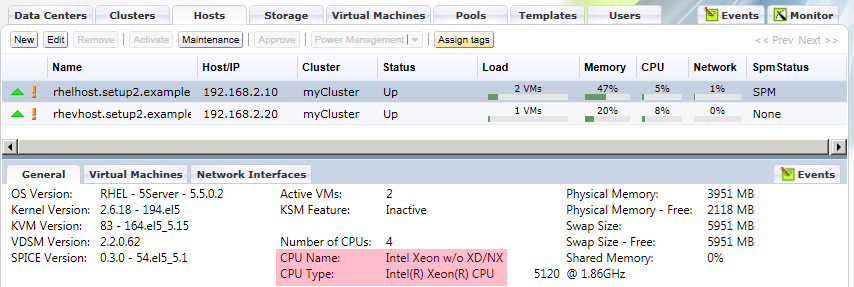
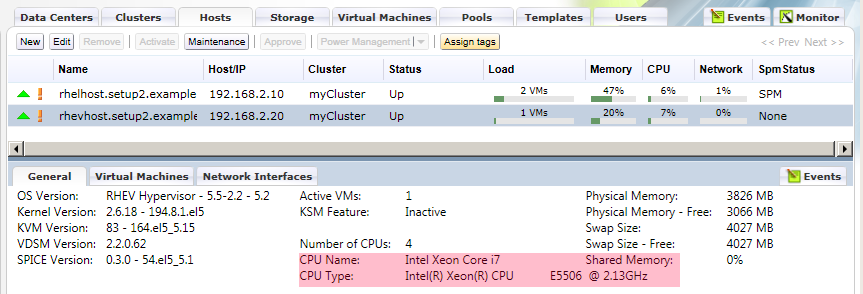
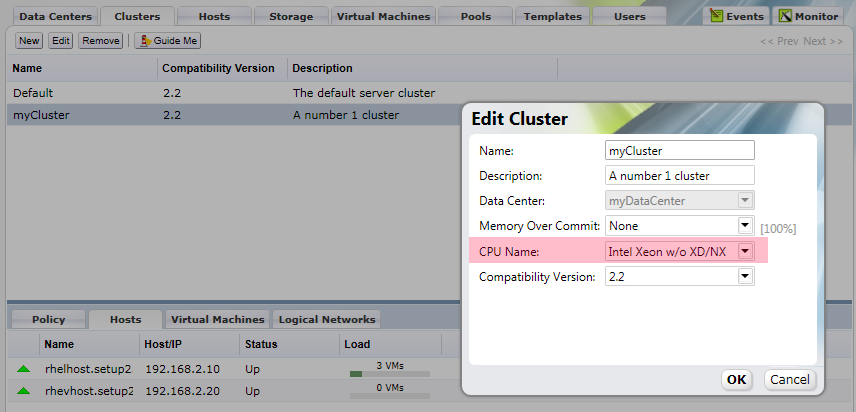
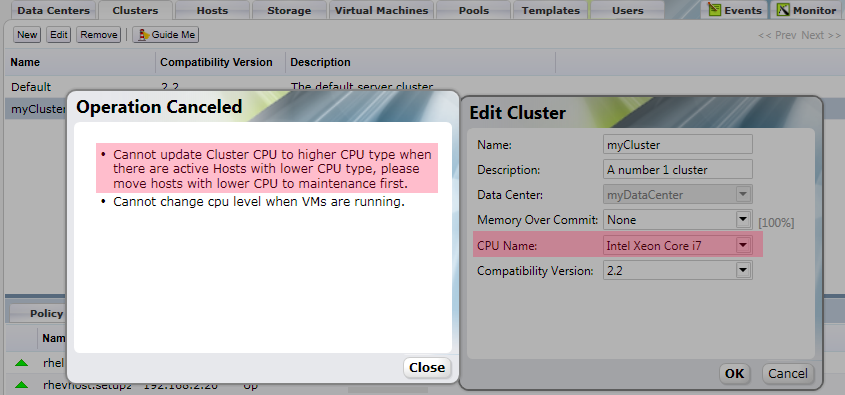
Cluster CPU Name must be only as high as the lowest host in the cluster. When adding the first host to a cluster the cluster takes the CPU name of the first host added. If you add a host that has a very new CPU first and then try to add a host with an older CPU it won’t add. The solution is to change the CPU name of the Cluster to the CPU type of the lowest host.
In the screenshots above rhelhost has a lower CPU Type than rhevhost, if we try to raise the CPU name to the highest available we will get an error